
Introduction
MailerLite vs Mailchimp is a popular comparison for businesses, creators, and marketers who are searching for the right email marketing platform. Choosing the best tool can influence how easily you build your audience, automate your campaigns, and create stronger relationships with your subscribers.
Both platforms offer powerful email marketing features, but they are built with different priorities in mind. MailerLite focuses on simplicity, affordability, and a beginner-friendly experience, making it a strong choice for small businesses and creators. Mailchimp, on the other hand, provides advanced marketing tools, detailed analytics, and a wider range of integrations for businesses that need more flexibility.
In this complete MailerLite vs Mailchimp comparison, we will analyze the key differences between these two platforms, including features, pricing, automation, email templates, integrations, deliverability, and overall value, helping you choose the email marketing solution that best fits your goals.
Table of Contents
Quick Comparison Table
Choosing between MailerLite vs Mailchimp depends on what you need from an email marketing platform. While both tools help businesses create campaigns, automate emails, and manage subscribers, they are built with different users in mind.
MailerLite focuses on simplicity, affordability, and ease of use. It is especially popular among small businesses, bloggers, freelancers, and creators who want professional email marketing features without unnecessary complexity.
Mailchimp, however, takes a broader approach. With its larger ecosystem, advanced marketing features, and extensive integrations, it is often preferred by growing businesses that need more powerful tools and deeper customization options.
The comparison table below highlights the main differences between MailerLite and Mailchimp, helping you quickly understand which platform may fit your goals.
| Feature | MailerLite | Mailchimp |
|---|---|---|
| Best For | Small businesses, bloggers, creators | Growing businesses and marketing teams |
| Ease of Use | Excellent | Very Good |
| Free Plan | Yes | Yes |
| Starting Price | More affordable | Higher starting cost |
| Email Builder | Simple drag-and-drop editor with modern templates | Advanced editor with a larger template library |
| Automation | Powerful automation included at affordable prices | Advanced automation with more features on premium plans |
| Deliverability | Excellent | Excellent |
| Integrations | 150+ integrations | 300+ integrations |
| Analytics | Detailed campaign reports | Advanced reporting and insights |
| Customer Support | Email and live chat options | Email, chat, and premium support options |
| Overall Value | Excellent | Very Good |
Quick Summary:
For users who want an affordable, beginner-friendly platform with strong automation and a clean interface, MailerLite offers outstanding value. It provides almost everything most small businesses need to run successful email campaigns.
Mailchimp is the better choice for companies that require advanced marketing features, more integrations, and a wider range of business tools. However, these extra capabilities often come with higher costs and a slightly steeper learning curve.
Ease of Use
When comparing MailerLite vs Mailchimp, usability is one of the first things beginners should consider. A powerful platform is only useful if you can actually use it efficiently.
A simple interface can reduce the time spent creating campaigns, managing subscribers, and setting up automation. This is where the two platforms take different approaches.
MailerLite
MailerLite is built around simplicity. From the moment you enter the dashboard, everything feels organized and easy to understand. The clean layout removes unnecessary distractions, making it easier for beginners to find important tools without feeling overwhelmed.
Creating an email campaign is quick with the drag-and-drop editor, and managing subscribers, forms, and automation workflows requires only a few steps.
This straightforward experience makes MailerLite a strong option for bloggers, creators, freelancers, and small businesses that want to focus more on marketing and less on learning complicated software.
Read the Full MailerLite Review
Mailchimp
Mailchimp also provides a polished and professional interface, but its larger feature set creates a different experience. Because the platform includes more marketing tools, audience options, and advanced settings, beginners may need extra time to understand where everything is located.
Once users become familiar with the platform, Mailchimp becomes easier to navigate. However, compared with MailerLite, the first-time setup can feel slightly more demanding.
See the Full Mailchimp Review
Ease of Use Comparison
| Feature | MailerLite | Mailchimp |
|---|---|---|
| Beginner-Friendly | Excellent | Very Good |
| Dashboard Simplicity | Excellent | Very Good |
| Learning Curve | Very Low | Moderate |
| Campaign Setup | Fast and Easy | Easy after learning |
| Navigation | Clean and Simple | Feature-rich but more complex |
Winner: MailerLite
MailerLite wins this category because it delivers a smoother experience for beginners. The interface is cleaner, the learning curve is shorter, and users can start creating professional campaigns almost immediately.
Mailchimp remains a capable platform, especially for businesses that need advanced marketing features. However, those additional tools add some complexity, making it better suited for users who are willing to spend more time learning the system.
Email Builder & Templates
A good email builder can save hours of design work. Whether you are creating newsletters, promotional emails, or automated campaigns, having flexible templates and an easy editor makes the process much smoother.
Both MailerLite and Mailchimp provide drag-and-drop email builders, but their approach is different.
MailerLite
MailerLite offers a modern drag-and-drop email editor designed for users who want to create attractive emails without technical skills.
You can easily add images, buttons, videos, social media links, countdown timers, and other content blocks by simply moving elements around the page.
The platform also includes responsive templates that automatically adapt to mobile devices. Users can start with a ready-made design or build a custom email from scratch and save it for future campaigns.
Read the Full MailerLite Review
Mailchimp
Mailchimp provides a more advanced email builder with a larger selection of professionally designed templates. It gives businesses more control over branding, layouts, and customization options.
For companies that want highly detailed email designs, Mailchimp offers more flexibility. However, the wider range of features can make the editor feel less beginner-friendly compared with MailerLite.
See the Full Mailchimp Review
Email Builder & Templates Comparison
| Feature | MailerLite | Mailchimp |
|---|---|---|
| Drag-and-Drop Editor | Excellent | Excellent |
| Template Library | Very Good | Excellent |
| Customization Options | Simple and Flexible | Advanced and Extensive |
| Mobile-Responsive Templates | Yes | Yes |
| Custom Templates | Yes | Yes |
| Beginner-Friendly | Excellent | Very Good |
Winner: Mailchimp
Mailchimp takes the lead because of its larger template library and deeper customization options. Businesses that care heavily about branding and advanced email designs may prefer its flexibility.
However, MailerLite remains an excellent choice for most creators and small businesses. Its editor is faster, easier to learn, and provides all the essential tools needed to create professional-looking emails.
Automation Features
Email automation is one of the most valuable features of any email marketing platform. It allows businesses to send the right message at the right time without manually managing every campaign.
Both MailerLite and Mailchimp provide automation tools, but they are designed for slightly different users.
MailerLite
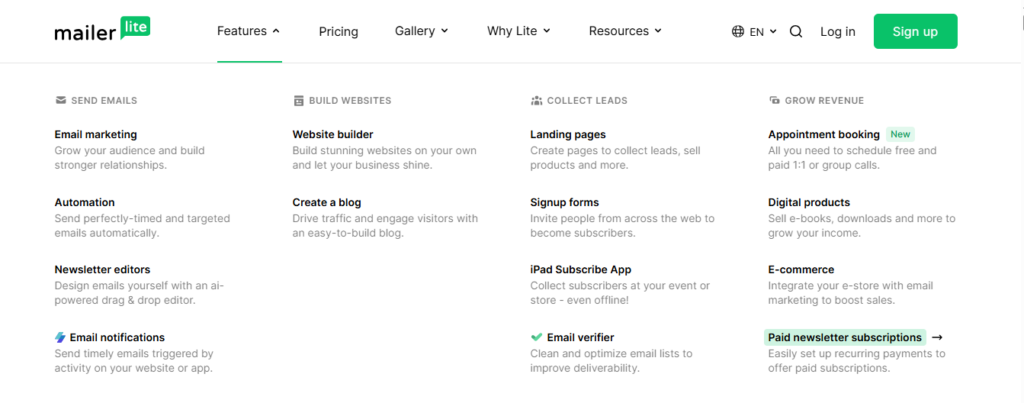
MailerLite makes automation easy with its visual workflow builder. Users can create automated email sequences by selecting triggers, adding actions, and connecting different steps together.
You can build welcome email series, abandoned cart campaigns, lead nurturing sequences, re-engagement emails, and follow-up messages without needing technical experience.
The automation editor is clean and beginner-friendly. Even someone creating their first workflow can quickly understand how emails are triggered based on subscriber actions, form registrations, link clicks, or specific segments.
For small businesses and creators, MailerLite provides a strong balance between powerful automation features and ease of use.
Read the Full MailerLite Review
Mailchimp
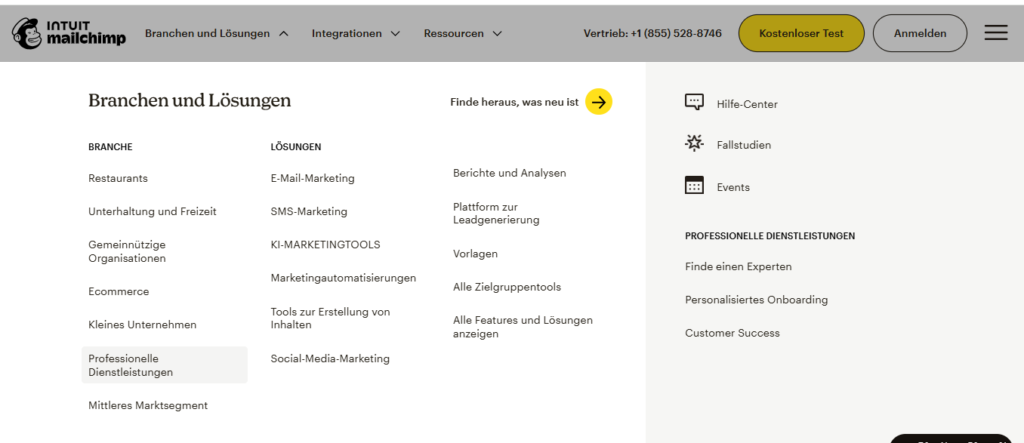
Mailchimp offers a more advanced automation system through its customer journey builder. It allows businesses to create detailed workflows based on customer behavior, purchase activity, engagement levels, and audience data.
This makes Mailchimp a strong choice for companies that need complex marketing sequences and highly personalized customer journeys.
However, many of the advanced automation features are limited to higher-priced plans. For smaller businesses, this can make Mailchimp less attractive compared with MailerLite’s affordable automation options.
See the Full Mailchimp Review
Automation Features Comparison
| Feature | MailerLite | Mailchimp |
|---|---|---|
| Visual Automation Builder | Excellent | Excellent |
| Welcome Email Series | Yes | Yes |
| Abandoned Cart Emails | Yes | Yes |
| Behavioral Triggers | Yes | Yes |
| Advanced Customer Journeys | Good | Excellent |
| Workflow Creation | Very Easy | Easy with experience |
| Automation Value | Excellent | Very Good |
Winner: MailerLite
MailerLite wins this category because it provides powerful automation features without making users deal with unnecessary complexity.
For bloggers, creators, and small businesses, it offers everything needed to create effective automated campaigns at a lower cost.
Mailchimp is the better option for larger companies that need advanced customer journeys and deeper marketing automation. However, those additional features are mainly valuable for businesses with more complex requirements.
Email Deliverability
Email deliverability plays a major role in the success of any email marketing campaign. A beautifully designed email means little if it never reaches the subscriber’s inbox.
A reliable platform should help businesses maintain a strong sender reputation, reduce spam issues, and improve the chances of emails being delivered successfully.
Both MailerLite and Mailchimp have strong reputations for email deliverability and provide tools that support better sending practices.
MailerLite
MailerLite offers excellent deliverability performance and uses industry-standard authentication methods such as SPF, DKIM, and DMARC to improve email security and sender verification.
The platform also encourages good email practices by helping users manage inactive subscribers, monitor engagement, and maintain a healthy email list.
For beginners and small businesses, MailerLite provides reliable delivery without requiring advanced technical knowledge.
Read the Full MailerLite Review
Mailchimp
Mailchimp has one of the largest email-sending infrastructures in the industry. Its long history and global user base allow it to maintain strong delivery systems.
The platform provides detailed analytics that help users monitor important metrics such as open rates, clicks, bounce rates, and subscriber engagement.
However, because Mailchimp serves a very large number of users, maintaining a clean email list and following best practices is essential for achieving the best results.
See the Full Mailchimp Review
Email Deliverability Comparison
| Feature | MailerLite | Mailchimp |
|---|---|---|
| Deliverability Performance | Excellent | Excellent |
| SPF & DKIM Authentication | Yes | Yes |
| Spam Protection | Strong | Strong |
| Sender Reputation Tools | Yes | Yes |
| Bounce Management | Yes | Yes |
| Email Monitoring | Good | Advanced |
Winner: Tie
When it comes to deliverability, both platforms perform extremely well. There is no clear winner because inbox placement depends on many factors, including email quality, subscriber engagement, list management, and sending frequency.
MailerLite is a great option for users who want simple deliverability tools with an easy setup. Mailchimp may appeal more to larger organizations that need deeper reporting and advanced email management.
List Management & Segmentation
A successful email marketing strategy depends on sending relevant content to the right audience. This is where list management and segmentation become essential.
Instead of sending the same message to every subscriber, businesses can divide their audience based on interests, behavior, location, or engagement level. Both MailerLite and Mailchimp provide segmentation tools, but they approach audience management differently.
MailerLite
MailerLite keeps subscriber management simple by using groups, segments, and custom fields.
Users can organize contacts based on actions such as email engagement, signup source, location, or previous campaign activity. For example, you can create a segment of subscribers who clicked a specific link or separate new subscribers from long-term customers.
The platform makes importing contacts, creating signup forms, and maintaining an organized subscriber database straightforward.
This simplicity makes MailerLite especially appealing to small businesses that need effective segmentation without complicated systems.
Read the Full MailerLite Review
Mailchimp
Mailchimp offers a more advanced audience management system designed for businesses with larger subscriber databases.
Users can organize contacts through tags, groups, segments, and custom fields. The platform allows deeper targeting based on customer behavior, purchase history, engagement patterns, and other data points.
These advanced options are valuable for businesses running complex marketing campaigns. However, the system can feel more complicated for beginners managing smaller email lists.
See the Full Mailchimp Review
List Management & Segmentation Comparison
| Feature | MailerLite | Mailchimp |
|---|---|---|
| Subscriber Organization | Simple and Effective | Advanced and Flexible |
| Segmentation Options | Excellent | Excellent |
| Tags & Groups | Yes | Yes |
| Behavioral Segmentation | Yes | Yes |
| Custom Fields | Yes | Yes |
| Ease of Management | Excellent | Very Good |
| Advanced Targeting | Good | Excellent |
Winner: Mailchimp
Mailchimp wins this category because it provides more advanced audience targeting options. Businesses with large customer databases can create highly specific segments and personalized campaigns.
However, MailerLite remains a strong choice for most users. It delivers all the essential segmentation features needed by small businesses, creators, and bloggers while keeping the experience simple and easy to manage.
Pricing & Value for Money
Pricing is often one of the deciding factors when choosing an email marketing platform. Businesses want powerful features, but they also need a solution that fits their budget as their subscriber list grows.
When comparing MailerLite vs Mailchimp, both platforms provide free plans and paid options. However, their pricing strategies are quite different.
MailerLite focuses on affordability and providing strong features at a lower cost. Mailchimp offers a wider marketing ecosystem, but its pricing can become more expensive as businesses scale.
MailerLite Pricing
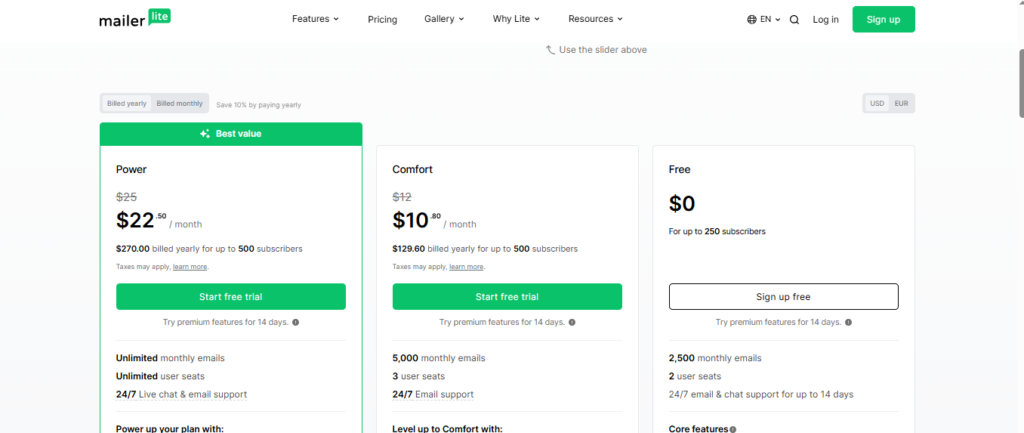
MailerLite is well known for offering excellent value for money. Its free plan allows beginners to start email marketing without upfront costs while still accessing important features such as campaigns, automation, landing pages, and subscriber management.
The paid plans add more advanced tools, including increased limits, better support, and additional marketing features.
For small businesses, freelancers, and creators, MailerLite provides professional email marketing capabilities without putting too much pressure on the budget.
Read the Full MailerLite Review
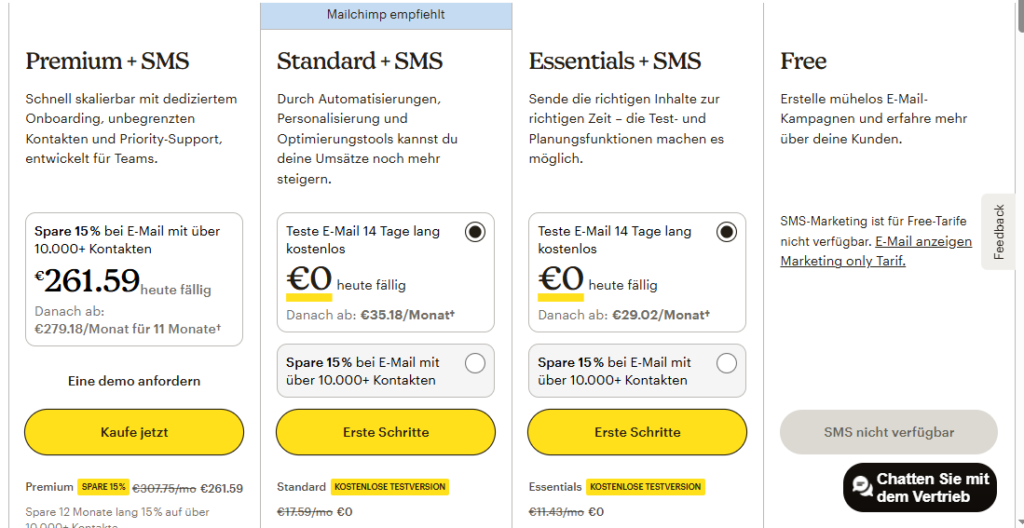
Mailchimp Pricing
Mailchimp also offers a free plan, but users may reach its limits faster as their audience grows.
Many advanced features, including deeper segmentation, enhanced analytics, and additional automation options, require higher-tier plans.
Although Mailchimp provides more marketing tools and integrations, the overall cost can increase significantly for businesses with larger email lists.
See the Full Mailchimp Review
Pricing & Value Comparison
| Feature | MailerLite | Mailchimp |
|---|---|---|
| Free Plan | Yes | Yes |
| Affordable Paid Plans | Excellent | Good |
| Features Included | Excellent | Very Good |
| Automation Value | Strong | Better on premium plans |
| Scalability | Good | Excellent |
| Value for Small Businesses | Excellent | Very Good |
Winner: MailerLite
MailerLite wins the pricing category because it delivers more value for users who want affordable but powerful email marketing tools.
For most small businesses, bloggers, and creators, it provides the right combination of features, simplicity, and reasonable pricing.
Mailchimp remains a strong platform for companies that need advanced marketing capabilities and a larger ecosystem. However, businesses focused on getting the most features for their budget will often find MailerLite to be the better investment.
Integrations
Integrations are an important part of any email marketing platform because they allow your email tool to work together with the other systems you already use, such as websites, online stores, CRMs, payment platforms, and productivity tools.
A strong integration ecosystem helps businesses automate repetitive tasks, collect useful customer data, and create more personalized campaigns. When comparing MailerLite vs Mailchimp, both platforms provide connections with popular tools, but Mailchimp has a clear advantage because of its larger ecosystem and longer history in the market.
MailerLite Integrations
MailerLite offers integrations with many of the essential tools that small businesses and creators commonly use. It connects with platforms such as WordPress, Shopify, WooCommerce, Stripe, Zapier, and other marketing applications.
These integrations make it easier to add new subscribers automatically, track customer activity, and create targeted email campaigns based on user behavior.
Although MailerLite covers the most important integrations needed by most small businesses, its marketplace is smaller compared with Mailchimp. Users who only need common connections will find MailerLite more than capable, but companies using many different business systems may need more options.
Read the Full MailerLite Review
Mailchimp Integrations
Mailchimp provides one of the largest integration libraries in the email marketing industry. It connects with hundreds of third-party applications, including eCommerce platforms, CRM software, analytics tools, social media platforms, and business management systems.
This wider ecosystem makes Mailchimp a strong choice for growing companies that depend on multiple tools and need advanced data sharing between platforms.
However, the larger number of features and connections can also make the setup process more complicated, especially for beginners who only need basic integrations.
See the Full Mailchimp Review
Integrations Comparison
| Feature | MailerLite | Mailchimp |
|---|---|---|
| Number of Integrations | 150+ | 300+ |
| WordPress Integration | Yes | Yes |
| Shopify Integration | Yes | Yes |
| WooCommerce Integration | Yes | Yes |
| Zapier Support | Yes | Yes |
| CRM Integrations | Good | Excellent |
| Third-Party Ecosystem | Good | Excellent |
Winner: Mailchimp
Mailchimp wins this category because it offers a much larger selection of integrations and better support for complex marketing environments.
For businesses that use multiple platforms and require advanced connections, Mailchimp provides more flexibility.
However, MailerLite still offers everything most bloggers, creators, and small businesses need. If your main tools are WordPress, Shopify, WooCommerce, or Zapier, MailerLite provides enough integration power without adding unnecessary complexity.
Reporting & Analytics
Analytics help you understand whether your email campaigns are working or simply being sent without meaningful results. By tracking important metrics like open rates, clicks, conversions, and subscriber engagement, businesses can improve their strategies and create better campaigns.
Both MailerLite and Mailchimp provide detailed reporting tools, but they focus on different levels of analysis.
MailerLite Reporting & Analytics
MailerLite provides a clean reporting dashboard designed for users who want important information without unnecessary complexity.
Users can monitor key metrics such as open rates, click-through rates, unsubscribes, and subscriber activity. The platform also includes features like click maps, engagement tracking, and automation reports.
These tools help small businesses understand what content performs well and make smarter decisions for future campaigns.
For bloggers, creators, and beginners, MailerLite provides enough analytics to measure success without making the process overwhelming.
Mailchimp Reporting & Analytics
Mailchimp offers a more advanced analytics system built for businesses that need detailed marketing insights.
Along with standard campaign reports, users can access audience growth reports, campaign comparisons, customer behavior data, and revenue tracking features.
This makes Mailchimp especially useful for eCommerce businesses that want to measure how email campaigns contribute directly to sales.
However, some advanced reporting features are only available on higher-priced plans, which may not be ideal for smaller businesses with limited budgets.
See the Full Mailchimp Review
Reporting & Analytics Comparison
| Feature | MailerLite | Mailchimp |
|---|---|---|
| Open & Click Tracking | Yes | Yes |
| Campaign Reports | Excellent | Excellent |
| Click Maps | Yes | Yes |
| A/B Testing Reports | Yes | Yes |
| Revenue Tracking | Limited | Advanced |
| Audience Insights | Good | Excellent |
| Ease of Understanding | Excellent | Very Good |
Winner: Mailchimp
Mailchimp takes the lead because it provides more advanced reporting features, deeper audience insights, and stronger revenue tracking options.
For businesses that make decisions based on detailed data, Mailchimp offers more powerful analytics.
However, MailerLite remains a great choice for users who want simple and practical reports. Its clean dashboard makes it easier for beginners to understand campaign performance and improve their email marketing strategy.
Customer Support
Customer support becomes especially important when you are managing email campaigns, automation workflows, and subscriber data. A quick solution can save hours of frustration and prevent marketing problems from affecting your business.
Both MailerLite and Mailchimp provide support resources, but their approach is slightly different.
MailerLite Customer Support
MailerLite is known for providing beginner-friendly support. Users can access help through email support and live chat options on eligible plans.
The platform also offers a detailed knowledge base, tutorials, guides, and educational resources that help users solve common problems independently.
Because MailerLite is designed with simplicity in mind, many users can quickly find solutions without needing technical experience.
For small businesses, freelancers, and creators, MailerLite provides reliable support that matches the needs of most users.
Read the Full MailerLite Review
Mailchimp Customer Support
Mailchimp offers multiple support channels, including email support, live chat, tutorials, documentation, and a large user community.
Its knowledge base covers a wide range of topics, from basic campaign creation to advanced automation and integrations.
However, support availability depends heavily on the subscription plan. Free users have fewer options, while premium customers receive faster and more advanced assistance.
Since Mailchimp includes more complex features, some users may need additional help when setting up advanced campaigns.
See the Full Mailchimp Review
Customer Support Comparison
| Feature | MailerLite | Mailchimp |
|---|---|---|
| Email Support | Yes | Yes |
| Live Chat Support | Yes (paid plans) | Yes (selected plans) |
| Knowledge Base | Excellent | Excellent |
| Video Tutorials | Yes | Yes |
| Beginner-Friendly Support | Excellent | Very Good |
| Premium Support Options | Good | Excellent |
Winner: MailerLite
MailerLite wins because it provides a simpler and more accessible support experience for most users.
Its helpful resources, easy interface, and beginner-focused approach make solving problems faster and easier.
Mailchimp is still a strong option for larger businesses that need advanced support services. However, users who prefer straightforward and friendly assistance will likely find MailerLite more comfortable.
Pros and Cons
Pros
Advanced Marketing Features
Mailchimp provides powerful tools for segmentation, analytics, automation, audience management, and customer tracking.
Large Integration Library
With hundreds of integrations, Mailchimp connects with many business tools, eCommerce platforms, CRMs, and marketing applications.
Detailed Reporting and Analytics
Mailchimp offers advanced reports, customer insights, campaign comparisons, and revenue tracking features that help businesses make data-driven decisions.
Cons
Higher Pricing
Mailchimp can become expensive as your subscriber list grows. Businesses may need to upgrade to higher plans to access important features.
More Complex for Beginners
Because Mailchimp includes many advanced tools, the platform can feel overwhelming for users who only need simple email marketing features.
Pros and Cons Comparison
| Category | MailerLite | Mailchimp |
|---|---|---|
| Pricing | ✔️ More Affordable | ✖️ More Expensive |
| Ease of Use | ✔️ Excellent | Good |
| Automation | ✔️ Strong | ✔️ Advanced |
| Integrations | Good | ✔️ Excellent |
| Analytics | Good | ✔️ Advanced |
| Best For | Beginners & Small Businesses | Growing Businesses & Marketing Teams |
Final Thoughts
MailerLite is the better option for users who want an affordable, simple, and reliable email marketing platform. It provides the essential features needed to create successful campaigns without adding unnecessary complexity.
Mailchimp is a stronger choice for businesses that need advanced analytics, more integrations, and powerful marketing tools. However, these additional capabilities often come with higher costs and a steeper learning curve.
Final Verdict
Choosing between MailerLite vs Mailchimp depends on your business size, marketing goals, budget, and the level of complexity you need.
After comparing both platforms across important categories, including ease of use, email design, automation, deliverability, pricing, integrations, analytics, and customer support, it is clear that both tools have their own strengths.
MailerLite stands out as the better choice for beginners, creators, bloggers, and small businesses. It offers a simple interface, affordable pricing, strong automation features, and all the essential tools needed to build effective email campaigns.
Mailchimp, on the other hand, is better suited for businesses that need advanced reporting, larger integrations, deeper audience targeting, and more complex marketing workflows.
The right choice depends on what you value most: simplicity and affordability, or advanced features and scalability.
Which One Should You Choose ?
Choose MailerLite if you:
✔️ Want an affordable email marketing platform
✔️ Are a beginner or small business owner
✔️ Need simple but effective automation
✔️ Prefer a clean and easy-to-use interface
✔️ Want strong features without paying too much
Choose Mailchimp if you:
✔️ Need advanced analytics and reporting
✔️ Manage complex marketing campaigns
✔️ Require more third-party integrations
✔️ Run a growing business with larger needs
✔️ Need powerful audience segmentation tools
See the Full Mailchimp Review
Overall Winner: MailerLite
For most users, MailerLite is the better choice because it provides the strongest balance between features, simplicity, and affordability.
It gives small businesses and creators everything they need to create professional email campaigns, automate communication, and grow their audience without unnecessary complexity.
Mailchimp remains an excellent platform for larger companies that need enterprise-level tools, advanced reporting, and a broader marketing ecosystem.
However, for most users looking for an effective email marketing solution that is easy to learn and affordable to maintain, MailerLite offers the better overall value.
Final Recommendation
If you are starting email marketing or running a small-to-medium-sized business, MailerLite is the recommended choice. It delivers a smoother user experience, powerful features, and better value for the price.
Choose Mailchimp when your business requires advanced marketing capabilities and you are prepared to invest more time and money into a larger platform.
Conclusion
Choosing the right email marketing platform depends on your business goals, budget, and the features you need to grow your audience. After comparing MailerLite vs Mailchimp across key areas such as ease of use, automation, email design, pricing, integrations, analytics, and customer support, both platforms prove to be strong options.
MailerLite stands out as the best choice for beginners, bloggers, creators, and small businesses that want a simple yet powerful email marketing solution. Its affordable pricing, clean interface, and user-friendly automation tools make it easier to create professional campaigns without dealing with unnecessary complexity.
Mailchimp remains a powerful option for businesses that need advanced reporting, extensive integrations, and more sophisticated marketing features. However, its higher pricing and more complex interface may not be ideal for users who are looking for a straightforward email marketing platform.
Overall, MailerLite offers the best balance of features, affordability, and simplicity for most users. It provides everything needed to build email campaigns, manage subscribers, and grow an online business effectively.
If you are just starting with email marketing or running a small-to-medium-sized business, MailerLite is likely the better investment. For larger companies that require advanced marketing tools and deeper analytics, Mailchimp can still be a valuable choice.
Looking for the right marketing tools? Explore expert reviews, comparisons, and guides at AmiinMarketer.com.