
Introduction
HubSpot is an all-in-one CRM and marketing platform designed to help businesses attract leads, manage customer relationships, automate marketing activities, and improve sales performance from one central dashboard. Instead of relying on multiple separate tools, businesses can use HubSpot to combine CRM, email marketing, marketing automation, sales management, customer service, content management, and analytics in a single platform.
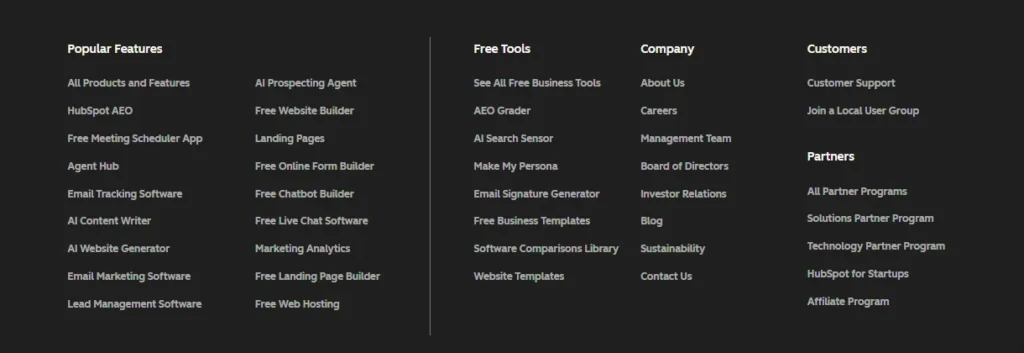
One of the biggest strengths of HubSpot is its free CRM, which allows businesses to organize contacts, track customer interactions, manage deals, and monitor their sales pipeline without an initial investment. As a business grows, it can access more advanced features through HubSpot’s different products, including Marketing Hub, Sales Hub, Service Hub, CMS Hub, and Operations Hub.
Whether you are running a small business, a growing startup, or a larger organization, HubSpot provides tools that help improve customer engagement, reduce repetitive work, and create more efficient marketing and sales processes. In this HubSpot review, we will explore its key features, pricing, advantages, and limitations to help you decide whether it is the right platform for your business.
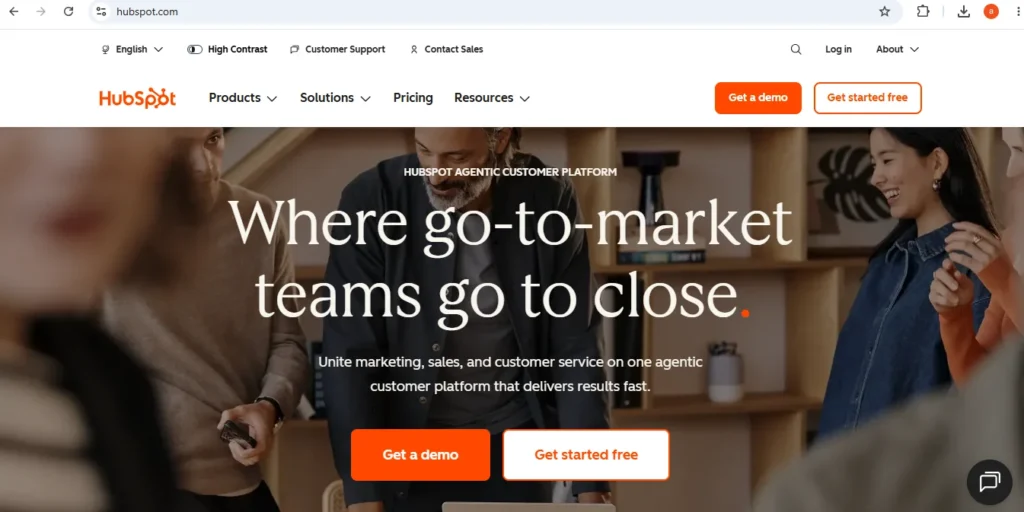
Table of Contents
HubSpot Features
HubSpot stands out because it offers a complete collection of tools that support different areas of business growth. Instead of switching between separate applications, teams can manage marketing campaigns, customer conversations, sales activities, and performance tracking from one platform.
These features are designed to help businesses save time, improve communication, and make better decisions using customer data. Below are the key features that make HubSpot a popular solution for companies of different sizes.
CRM
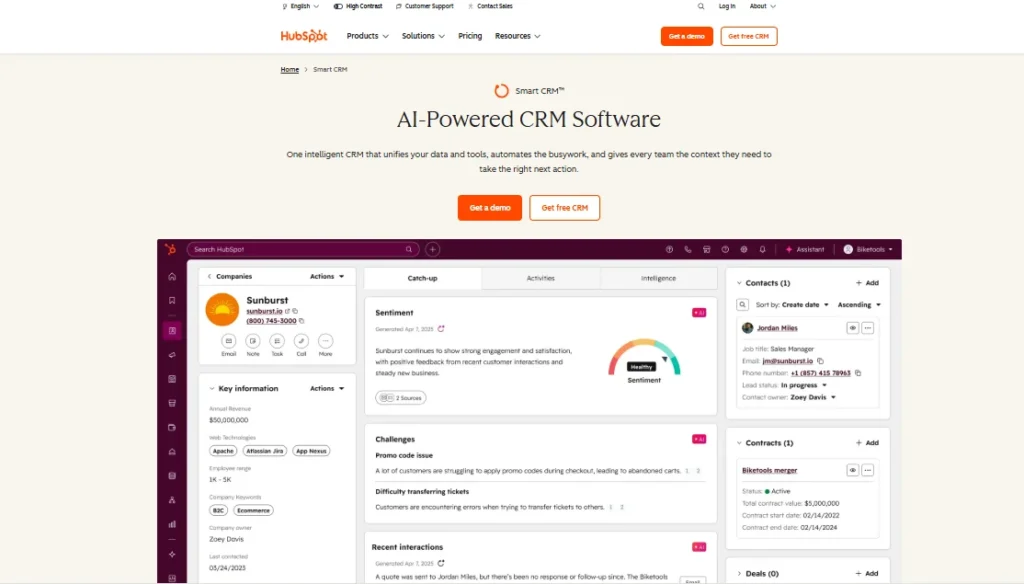
The HubSpot CRM is the foundation of the entire platform. It helps businesses store customer information, organize contacts, track interactions, and manage sales opportunities in a structured way.
With HubSpot CRM, teams can view customer histories, record emails and calls, create tasks, schedule meetings, and follow deals through every stage of the sales pipeline. This gives sales and marketing teams a complete picture of each customer relationship instead of working with disconnected information.
Another advantage of HubSpot CRM is its automation capabilities. Businesses can automatically update contact records, assign leads to team members, and create follow-up actions based on customer activity. These features reduce manual tasks and help sales teams focus more on building relationships and closing deals.
For businesses searching for a simple yet powerful CRM solution, HubSpot provides an excellent balance between ease of use and advanced functionality.
Email Marketing
HubSpot Email Marketing allows businesses to create professional email campaigns, communicate with customers, and nurture leads through personalized messages. The platform includes a drag-and-drop email builder, making it possible to design attractive emails without any coding knowledge.
Users can choose from ready-made templates, customize content, divide audiences into different segments, and schedule campaigns based on their marketing goals. This makes it easier to deliver relevant messages to specific groups of customers rather than sending the same email to everyone.
A major benefit of HubSpot Email Marketing is its connection with the CRM. Because customer information is stored in the same system, businesses can create more targeted campaigns based on customer behavior, interests, and previous interactions.
The platform also provides detailed analytics, including open rates, click-through rates, and campaign performance reports. These insights help marketers understand what works and improve future email strategies.
Marketing Automation
HubSpot Marketing Automation helps businesses reduce repetitive work by allowing them to create automated workflows that run based on customer actions. Instead of manually sending every email or updating every contact, businesses can build systems that handle these tasks automatically.
For example, a company can create a workflow that sends a welcome email when someone subscribes, follows up with leads after they download a resource, or notifies the sales team when a potential customer shows strong buying interest.
One of the strongest aspects of HubSpot’s automation tools is the connection between marketing activities and CRM data. Since all customer information is stored in one place, businesses can create more personalized campaigns and deliver messages at the right moment.
HubSpot also allows marketers to monitor workflow performance, analyze results, and make adjustments based on real customer behavior. This helps businesses create more efficient marketing processes while improving customer engagement.
Sales Tools
HubSpot provides a wide range of sales tools designed to help teams manage leads, track opportunities, and improve the sales process. Instead of relying on spreadsheets or disconnected systems, sales teams can organize their entire workflow inside one platform.
With HubSpot Sales Hub, businesses can track deals through different stages of the sales pipeline, monitor customer interactions, schedule meetings, and automate follow-up activities. Sales representatives can easily see where each prospect is in the buying journey and identify the next best action to take.
The platform also includes useful features such as email tracking, email templates, live chat, document sharing, and quote management. These tools help sales teams communicate more effectively and spend less time on repetitive administrative tasks.
Another advantage of HubSpot sales tools is the connection with marketing and CRM data. When sales teams have access to customer activity, previous conversations, and engagement history, they can create more personalized conversations and improve the chances of closing deals.
Overall, HubSpot’s sales features are valuable for businesses that want a more organized sales process and a clearer understanding of their customers.
Customer Service
HubSpot’s customer service tools help businesses create better support experiences and maintain stronger relationships with customers. Through the Service Hub, companies can manage customer questions, solve problems faster, and provide consistent support across different communication channels.
The platform includes features such as ticket management, shared inboxes, live chat, customer feedback tools, and knowledge bases. These features allow support teams to organize customer requests, track issues, and ensure that important conversations are not missed.
One of the biggest benefits of HubSpot Service Hub is that customer support information remains connected with CRM data. This means support teams can view customer history, previous interactions, and account details before responding to a request.
HubSpot also helps businesses create self-service options through knowledge bases and customer portals. By allowing customers to find answers on their own, companies can reduce support workload while improving the overall customer experience.
For businesses that want to provide faster, more personalized support, HubSpot offers a complete customer service solution that works together with marketing and sales activities.
Reporting and Analytics
HubSpot Reporting and Analytics helps businesses understand how their marketing, sales, and customer service efforts are performing. Instead of making decisions based on assumptions, teams can use real data to measure results and improve their strategies.
The platform provides customizable dashboards where users can track important metrics such as website traffic, email performance, lead generation, sales revenue, and customer engagement. These reports make it easier to identify successful campaigns and discover areas that need improvement.
One of HubSpot’s strongest advantages is that all reporting data is connected through the CRM. This gives businesses a complete view of the customer journey, from the first interaction with a brand to the final purchase.
For example, marketers can analyze which campaigns generate the highest-quality leads, while sales teams can measure pipeline performance and revenue growth. Businesses can also create custom reports based on their specific goals and requirements.
HubSpot’s analytics tools help companies move from guesswork to data-driven decision-making, allowing teams to improve performance and achieve better results over time.
Integrations
HubSpot Integrations allow businesses to connect the platform with other applications they already use. This creates a more connected workflow and helps teams manage information without constantly switching between different tools.
The HubSpot ecosystem supports thousands of integrations, including ecommerce platforms, communication apps, payment systems, productivity tools, advertising platforms, and analytics software. These connections make it easier to synchronize customer data and automate tasks across different systems.
For example, businesses can connect HubSpot with ecommerce platforms to track customer purchases, integrate communication tools to improve team collaboration, or connect advertising platforms to measure campaign results more accurately.
Another important advantage of HubSpot integrations is improved efficiency. When different systems share information automatically, businesses can reduce manual data entry, minimize errors, and provide customers with a smoother experience.
Whether a company is managing sales, marketing, customer support, or operations, HubSpot integrations provide the flexibility needed to build a customized technology setup.
HubSpot Pricing
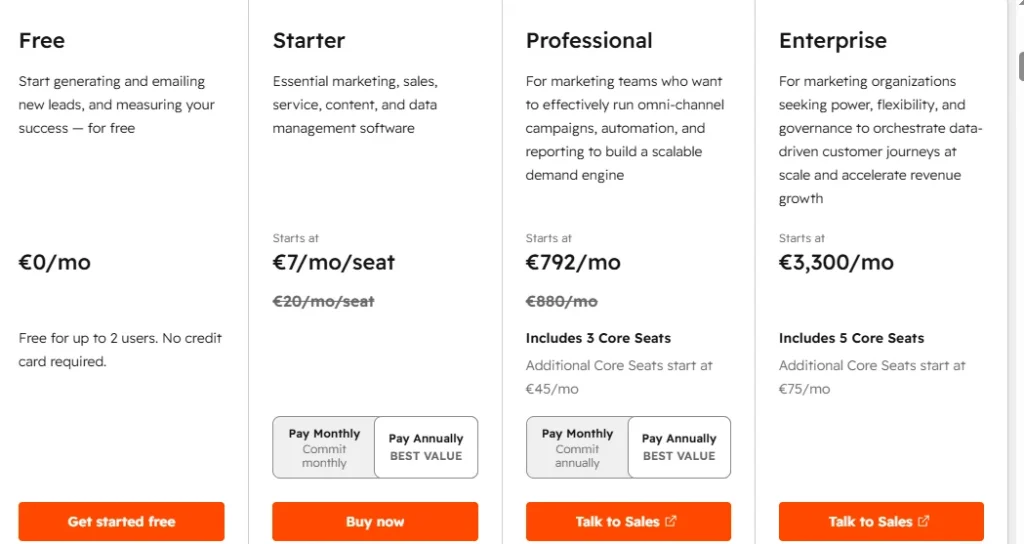
HubSpot offers a flexible pricing model designed to support businesses at different stages of growth. Users can start with free tools and upgrade to paid plans when they need more advanced features and greater functionality.
The free plan includes access to HubSpot’s CRM, contact management, forms, live chat, basic email marketing tools, and reporting features. This makes it a practical option for startups and small businesses that want to explore the platform without an initial investment.
For businesses that require more advanced capabilities, HubSpot provides premium plans across different products, including Marketing Hub, Sales Hub, Service Hub, CMS Hub, and Operations Hub. These paid plans unlock features such as advanced automation, AI-powered tools, detailed analytics, custom reporting, and additional team collaboration options.
However, HubSpot’s pricing can become expensive as a business grows. Costs may increase depending on the number of users, marketing contacts, and advanced features required. Companies should carefully evaluate their needs before choosing a plan to avoid paying for features they may not use.
Overall, HubSpot provides strong value for businesses that need a scalable all-in-one platform. While the premium plans may be costly, the combination of CRM, automation, marketing, and sales tools can make it a worthwhile investment for growing organizations.
HubSpot Ease of Use
One of the main reasons businesses choose HubSpot is its user-friendly design. The platform is built with simplicity in mind, allowing beginners and experienced marketers to manage their activities without dealing with unnecessary complexity.
The dashboard has a clean layout where users can quickly access CRM records, marketing campaigns, sales pipelines, reports, and customer service tools. Most features are organized logically, making it easier to find the right tools and complete tasks efficiently.
Getting started with HubSpot is also relatively simple. Users can import contacts, create email campaigns, build forms, and organize their sales process with guided steps and helpful recommendations. The drag-and-drop editors make designing emails, landing pages, and forms easier, even for people without technical experience.
However, while the basic features are easy to learn, some advanced tools may require additional time and practice. Features such as complex automation workflows, custom reporting, and advanced CRM settings can feel overwhelming for new users at first.
To support users, HubSpot provides extensive educational resources, including tutorials, templates, guides, and training through HubSpot Academy. These resources help businesses understand the platform and use its features more effectively.
Overall, HubSpot is one of the most beginner-friendly CRM and marketing platforms available. It offers a simple experience for new users while still providing powerful tools for businesses that need more advanced functionality.
HubSpot CRM
HubSpot CRM is the central system that connects all parts of the HubSpot platform. It helps businesses organize customer information, manage sales opportunities, track communication, and build stronger relationships with their audience.
The CRM allows users to store detailed contact records, including emails, calls, meetings, notes, and customer activities. Instead of searching through different systems, teams can access important customer information from one organized location.
One of the biggest benefits of HubSpot CRM is its sales pipeline management. Businesses can create deals, move opportunities through different stages, assign tasks to team members, and monitor progress toward revenue goals. This gives sales teams better visibility into their opportunities and helps them focus on the most valuable leads.
HubSpot CRM also includes automation features that reduce manual work. For example, businesses can automatically update customer records, create reminders, assign leads, and trigger follow-up actions based on specific activities.
Another strong feature is its reporting capability. Users can create dashboards that show sales performance, team activity, conversion rates, and customer trends. These insights help businesses understand what is working and where improvements are needed.
Because HubSpot CRM connects with email marketing, automation, sales, and customer service tools, it creates a complete view of the customer journey. This makes it easier for different teams to collaborate and provide a more personalized customer experience.
Overall, HubSpot CRM is a powerful yet easy-to-use solution for businesses that want to improve organization, manage customer relationships, and increase sales efficiency.
HubSpot Email Marketing
HubSpot Email Marketing helps businesses create targeted email campaigns, communicate with customers, and nurture leads throughout the buying journey. It combines email creation tools with CRM data, allowing businesses to send more relevant and personalized messages.
The platform includes a simple drag-and-drop email builder that allows users to design professional emails without coding knowledge. Businesses can customize templates, add images, personalize content, and create campaigns that match their brand identity.
Audience segmentation is another important feature of HubSpot Email Marketing. Instead of sending the same message to every subscriber, businesses can divide contacts into groups based on interests, behavior, location, previous interactions, or customer stage.
Automation makes email marketing even more powerful. Businesses can create workflows that automatically send welcome emails, follow-up messages, product updates, and promotional campaigns based on customer actions. This helps save time and ensures customers receive communication at the right moment.
HubSpot also provides detailed analytics to measure campaign performance. Marketers can track important metrics such as open rates, click-through rates, conversions, and overall engagement. These insights help businesses understand customer preferences and improve future campaigns.
The biggest advantage of HubSpot Email Marketing is its connection with the CRM. Since email activity and customer information are stored together, businesses can create more meaningful campaigns based on real customer behavior.
Overall, HubSpot Email Marketing is a strong choice for businesses that want more than basic email campaigns. It provides the tools needed to create personalized, automated, and data-driven email marketing strategies.
HubSpot Marketing Automation
HubSpot Marketing Automation helps businesses reduce repetitive work by allowing them to create automated workflows that run based on customer actions. Instead of manually sending every email or updating every contact, businesses can build systems that handle these tasks automatically.
For example, a company can create a workflow that sends a welcome email when someone subscribes, follows up with leads after they download a resource, or notifies the sales team when a potential customer shows strong buying interest.
One of the strongest aspects of HubSpot’s automation tools is the connection between marketing activities and CRM data. Since all customer information is stored in one place, businesses can create more personalized campaigns and deliver messages at the right moment.
HubSpot also allows marketers to monitor workflow performance, analyze results, and make adjustments based on real customer behavior. This helps businesses create more efficient marketing processes while improving customer engagement.
Sales Tools
HubSpot provides a wide range of sales tools designed to help teams manage leads, track opportunities, and improve the sales process. Instead of relying on spreadsheets or disconnected systems, sales teams can organize their entire workflow inside one platform.
With HubSpot Sales Hub, businesses can track deals through different stages of the sales pipeline, monitor customer interactions, schedule meetings, and automate follow-up activities. Sales representatives can easily see where each prospect is in the buying journey and identify the next best action to take.
The platform also includes useful features such as email tracking, email templates, live chat, document sharing, and quote management. These tools help sales teams communicate more effectively and spend less time on repetitive administrative tasks.
Another advantage of HubSpot sales tools is the connection with marketing and CRM data. When sales teams have access to customer activity, previous conversations, and engagement history, they can create more personalized conversations and improve the chances of closing deals.
Overall, HubSpot’s sales features are valuable for businesses that want a more organized sales process and a clearer understanding of their customers.
Customer Service
HubSpot’s customer service tools help businesses create better support experiences and maintain stronger relationships with customers. Through the Service Hub, companies can manage customer questions, solve problems faster, and provide consistent support across different communication channels.
The platform includes features such as ticket management, shared inboxes, live chat, customer feedback tools, and knowledge bases. These features allow support teams to organize customer requests, track issues, and ensure that important conversations are not missed.
One of the biggest benefits of HubSpot Service Hub is that customer support information remains connected with CRM data. This means support teams can view customer history, previous interactions, and account details before responding to a request.
HubSpot also helps businesses create self-service options through knowledge bases and customer portals. By allowing customers to find answers on their own, companies can reduce support workload while improving the overall customer experience.
For businesses that want to provide faster, more personalized support, HubSpot offers a complete customer service solution that works together with marketing and sales activities.
HubSpot Integrations
HubSpot Integrations allow businesses to connect the platform with other applications they already use. This creates a more connected workflow and helps teams manage information without constantly switching between different tools.
The HubSpot ecosystem supports thousands of integrations, including ecommerce platforms, communication apps, payment systems, productivity tools, advertising platforms, and analytics software. These connections make it easier to synchronize customer data and automate tasks across different systems.
For example, businesses can connect HubSpot with ecommerce platforms to track customer purchases, integrate communication tools to improve team collaboration, or connect advertising platforms to measure campaign results more accurately.
Another important advantage of HubSpot integrations is improved efficiency. When different systems share information automatically, businesses can reduce manual data entry, minimize errors, and provide customers with a smoother experience.
Whether a company is managing sales, marketing, customer support, or operations, HubSpot integrations provide the flexibility needed to build a customized technology setup.
HubSpot Reporting and Analytics
HubSpot Reporting and Analytics helps businesses understand how their marketing, sales, and customer service efforts are performing. Instead of making decisions based on assumptions, teams can use real data to measure results and improve their strategies.
The platform provides customizable dashboards where users can track important metrics such as website traffic, email performance, lead generation, sales revenue, and customer engagement. These reports make it easier to identify successful campaigns and discover areas that need improvement.
One of HubSpot’s strongest advantages is that all reporting data is connected through the CRM. This gives businesses a complete view of the customer journey, from the first interaction with a brand to the final purchase.
For example, marketers can analyze which campaigns generate the highest-quality leads, while sales teams can measure pipeline performance and revenue growth. Businesses can also create custom reports based on their specific goals and requirements.
HubSpot’s analytics tools help companies move from guesswork to data-driven decision-making, allowing teams to improve performance and achieve better results over time.
HubSpot Customer Support
HubSpot Customer Support is designed to help users solve problems, understand the platform, and get the most value from its wide range of tools. Since HubSpot combines CRM, marketing, sales, automation, and customer service features in one ecosystem, having accessible support options is essential for businesses that want to use the platform efficiently.
HubSpot provides several resources to help users find solutions quickly. Its knowledge base includes detailed guides, step-by-step tutorials, videos, and troubleshooting articles that explain how different features work. The HubSpot community forum also allows users to ask questions, share experiences, and learn from other businesses using the platform.
For customers on paid plans, HubSpot offers more direct support options, including email support, live chat, and phone assistance. These channels can be especially useful when businesses need help with technical issues, account management, or setting up more advanced features.
Another valuable resource is HubSpot Academy, which provides free online courses and training materials covering topics such as marketing, sales, CRM management, and automation. This educational platform helps both beginners and experienced users improve their skills and understand how to use HubSpot more effectively.
Overall, HubSpot Customer Support provides a strong combination of self-service resources, expert assistance, and educational content. Whether you are learning the platform for the first time or managing advanced business processes, HubSpot offers multiple support options to help you overcome challenges and continue growing.

HubSpot Pros and Cons
Like any business platform, HubSpot comes with both advantages and limitations. It provides a powerful collection of tools for marketing, sales, customer management, and automation, but it may not be the right choice for every company. Understanding its strengths and weaknesses can help businesses decide whether HubSpot matches their goals and budget.
Pros of HubSpot
All-in-One Platform
One of HubSpot’s biggest advantages is its ability to combine multiple business functions into one connected platform. Instead of using separate tools for CRM, email marketing, automation, sales, customer support, and analytics, businesses can manage everything from a single system.
This creates a smoother workflow because teams can access the same customer information across different departments. Marketing teams can understand customer behavior, sales teams can track opportunities, and support teams can view previous interactions without switching between different applications.
Free CRM Available
HubSpot offers a free CRM that provides valuable features without requiring an upfront investment. Businesses can manage contacts, track deals, organize customer information, and monitor sales activities at no cost.
This makes HubSpot an attractive option for startups and small businesses that want to improve their customer management process before investing in premium software.
Easy to Use
Despite offering advanced features, HubSpot maintains a clean and beginner-friendly interface. The platform includes drag-and-drop editors, templates, guided setup processes, and educational resources that make it easier for new users to get started.
Businesses do not need extensive technical knowledge to create campaigns, manage contacts, or organize sales activities.
Powerful Automation
HubSpot’s automation tools help businesses reduce repetitive tasks and improve efficiency. Users can automate emails, lead follow-ups, customer updates, and internal notifications.
By automating routine processes, teams can spend more time focusing on strategy, customer relationships, and revenue growth.
Strong Integrations
HubSpot connects with thousands of external applications, allowing businesses to customize their setup based on their existing tools and workflows.
Whether a company needs ecommerce connections, communication tools, analytics platforms, or productivity applications, HubSpot integrations make it easier to create a connected business environment.
Cons of HubSpot
Can Become Expensive
Although HubSpot provides many free tools, advanced features require paid plans. As businesses grow and need more contacts, users, automation, or reporting capabilities, the cost can increase significantly.
For small businesses with limited budgets, premium plans may become difficult to justify compared with more affordable alternatives.
Advanced Features Have a Learning Curve
The basic HubSpot tools are simple to use, but some advanced features require more time to understand. Complex automation workflows, custom reporting, and advanced CRM settings may take additional training and experience.
Businesses with larger teams may need time to fully learn and maximize the platform’s capabilities.
Limited Features on Free Plan
The free version of HubSpot is useful, but many powerful features are only available through paid plans. Businesses that need advanced automation, detailed analytics, or extensive customization may eventually need to upgrade.
May Be Too Powerful for Simple Needs
Some businesses only need basic email marketing or simple contact management. For these companies, HubSpot’s wide range of features may feel unnecessary and more complex than required.
A smaller business may find a simpler and less expensive tool better suited to its specific needs.
Overall, HubSpot is a strong platform with impressive capabilities, but businesses should carefully evaluate their goals, budget, and required features before making a decision.
Final Verdict
HubSpot is one of the most complete CRM and marketing platforms available today, offering businesses a centralized solution for managing customers, automating marketing activities, improving sales processes, and analyzing performance. Its combination of CRM tools, email marketing, automation, customer support, and reporting makes it a powerful option for companies that want to manage their growth from one platform.
The biggest strength of HubSpot is its all-in-one approach. Businesses can start with the free CRM, build their customer database, and gradually unlock more advanced features as their needs increase. This flexibility makes the platform suitable for startups, growing companies, and larger organizations that require a scalable solution.
Another major advantage is the connection between different HubSpot tools. Marketing, sales, and customer service teams can work with the same customer data, creating a more consistent experience for customers and improving internal collaboration.
However, HubSpot is not perfect for everyone. The pricing can become expensive, especially for businesses that need advanced features or manage a large number of contacts. Companies with very simple requirements may find more affordable platforms that provide only the essential tools they need.
Overall, HubSpot is an excellent choice for businesses looking for a reliable, scalable, and feature-rich platform. If your goal is to attract leads, build stronger customer relationships, automate repetitive tasks, and create a more efficient marketing and sales process, HubSpot is a platform worth considering.
Conclusion
HubSpot is a powerful all-in-one platform that helps businesses manage customer relationships, improve marketing performance, automate daily processes, and increase sales efficiency. With its user-friendly CRM, advanced automation features, email marketing tools, integrations, and detailed analytics, it provides businesses with a complete solution for managing growth.
The platform’s free CRM makes it accessible for beginners, while its advanced features provide the flexibility needed by growing teams. Businesses can create personalized marketing campaigns, track customer interactions, and improve decision-making through valuable data insights.
Although HubSpot’s pricing can become a challenge for smaller companies that need premium features, its overall value comes from having multiple business tools connected in one place. Instead of managing different systems separately, businesses can create a more organized and efficient workflow.
For companies looking for a scalable platform that combines marketing, sales, CRM, and customer service, HubSpot remains one of the strongest options available. Whether you are a startup, small business, or established organization, HubSpot provides the tools needed to attract customers, manage relationships, and support long-term growth.
Discover the best marketing tools, reviews, and guides at AmiinMarketer.com.