
Artificial intelligence has moved well beyond the realm of experimentation. In modern marketing, it is becoming an everyday working companion—helping teams generate ideas, shape campaigns, refine copy, create visuals, investigate unfamiliar topics, and take some of the repetitive weight off their shoulders.
And you don’t necessarily need a large software budget to start using it.
A growing number of platforms provide free AI features or free plans that can be surprisingly useful, particularly for freelancers, creators, startups, and small marketing teams. Of course, “free” rarely means unlimited. Usage caps, premium features, model access, integrations, and other restrictions can vary considerably from one platform to another.
This guide explores 15 free AI tools for marketing in 2026, covering everything from content creation and graphic design to advertising, customer management, research, and everyday productivity. More importantly, it looks at where each tool fits, how marketers can use it in practice, and where human judgment still matters.
Important: Free plans and AI capabilities change frequently. Before building an important workflow around any tool, check the provider’s latest pricing, terms, and feature availability.
Table of Contents
What Are AI Marketing Tools?
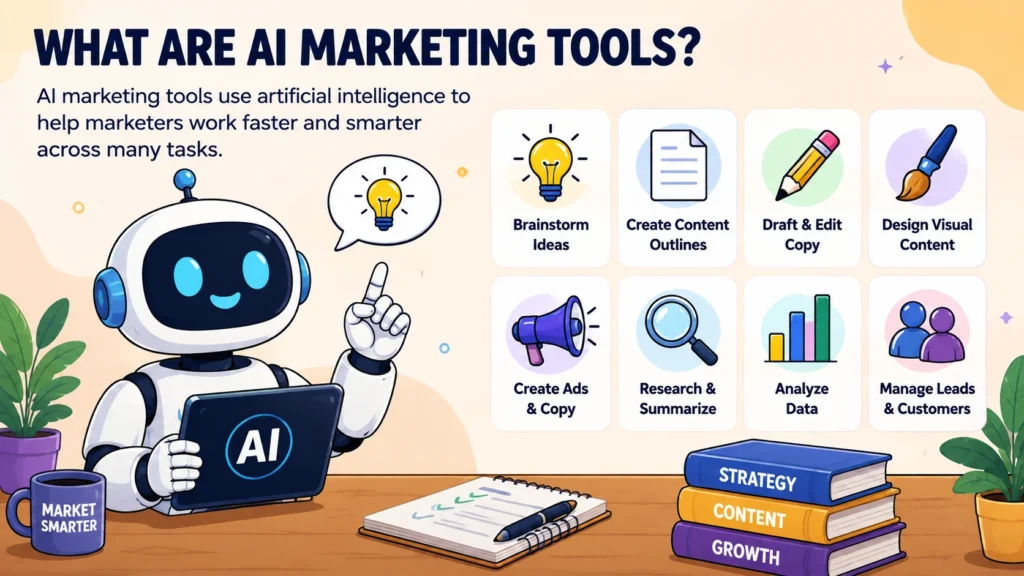
AI marketing tools are software applications that use artificial intelligence to assist with activities commonly performed by marketers.
That assistance can take many forms. Depending on the platform, an AI tool may help you brainstorm a campaign, turn scattered notes into a coherent outline, rewrite an awkward paragraph, generate advertising concepts, summarize research, analyze information, organize customer data, or transform one piece of content into several others.
Common applications include:
- Brainstorming campaign concepts
- Developing content outlines
- Drafting social media posts
- Rewriting and editing marketing copy
- Creating or improving visual designs
- Generating advertising copy
- Summarizing documents and research
- Analyzing information and data
- Organizing leads and customer information
- Repurposing existing content
The important distinction is this: AI is an accelerator, not a marketing strategy.
It can help a marketer move faster through repetitive or time-consuming work, but it does not remove the need for positioning, audience understanding, creativity, strategic thinking, or editorial judgment.
15 Free AI Tools for Marketing
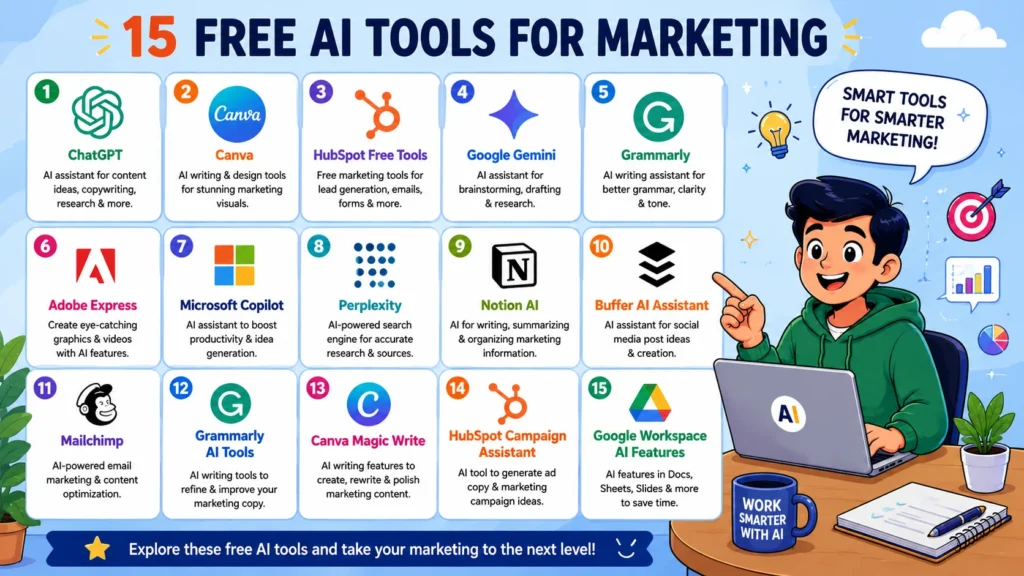
1. ChatGPT
Best for: Marketing ideas, content planning, copywriting, research assistance, and brainstorming
ChatGPT is one of the most versatile options for marketers because it can be used across a wide range of tasks rather than being confined to a single marketing function.
Depending on the current free-tier features available in your region, marketers can use it to brainstorm campaign concepts, build content outlines, rewrite existing copy, summarize information, analyze supplied material, and explore different creative directions.
OpenAI offers a Free tier, although its usage limits and available capabilities can change. Depending on the current offering, the free experience may also provide access to capabilities such as web search, file and image inputs, and image creation.
Marketing example:
A small business could provide information about its target customer, product, positioning, and preferred brand voice, then ask ChatGPT to generate 10 social media content ideas. The marketer can evaluate those ideas, verify any factual claims, adapt the language, and turn the strongest concepts into publishable content.
Limitation: AI can produce convincing but inaccurate information. Important facts, statistics, claims, and current information should therefore be independently verified.
2. Canva
Best for: Social media graphics, presentations, visual content, and copy editing
Canva brings AI-assisted writing and visual design together in a single environment, which makes it particularly convenient for marketers who regularly move between copy and creative assets.
Its Magic Write features can assist with generating, rewriting, rewording, and structuring text. Canva states that core Magic Write functionality is available to free-plan users subject to fair-use limits.
That combination can be useful when an idea needs to become something tangible. A campaign concept can evolve into a social post, presentation, promotional document, or branded visual without forcing the marketer to jump between several applications.
Marketing example:
Write a product announcement, use AI to tighten and improve the wording, then place the finished copy directly into a branded social media design.
Limitation: Advanced design capabilities, premium assets, and certain brand-management features may require a paid subscription.
3. HubSpot Free Marketing Tools
Best for: Lead generation, basic marketing management, and campaign workflows
HubSpot provides a collection of free marketing and lead-generation tools designed to support several foundational activities, including landing pages, forms, contact management, and reporting.
It also offers AI-oriented tools, including an AI advertising solution intended to help marketers develop advertising copy and creative concepts.
For smaller businesses, the appeal is less about having an enormous collection of features and more about bringing several basic marketing functions into one ecosystem.
Marketing example:
A small business could create a landing page and lead form, collect prospective customer information, organize those contacts, and monitor campaign activity from the same broader platform.
Limitation: More sophisticated automation, analytics, and marketing functionality may be reserved for paid products.
4. Google Gemini
Best for: Brainstorming, drafting, research assistance, and working within Google’s ecosystem
Google’s Gemini can function as a flexible AI assistant for marketers who need help thinking through ideas, organizing information, drafting content, or exploring different marketing approaches.
It can be especially convenient for teams already working extensively within Google’s broader ecosystem. Still, AI products evolve quickly, and features that exist today may not be included in tomorrow’s free offering.
Marketing example:
Give Gemini a product description and ask it to develop several content angles for different customer segments. A human marketer can then compare those approaches, select the most relevant one, and refine it for the intended audience.
Limitation: AI-generated responses require human review, particularly when the content involves factual claims or other information where accuracy matters.
5. Grammarly
Best for: Editing marketing copy and improving clarity
Marketing copy has a difficult job. It needs to be persuasive without becoming bloated, clear without sounding bland, and consistent without feeling repetitive.
Grammarly can help with that editing layer by reviewing written content and identifying issues that may interfere with clarity or readability.
Its free offering provides basic writing assistance, while some more advanced AI and writing capabilities may require a paid subscription.
Marketing example:
Run a draft email, landing-page section, or social media post through the writing assistant. Review the suggested changes manually, then keep only the edits that genuinely improve the message.
Limitation: A writing assistant can improve sentences, but it cannot determine whether the underlying marketing strategy makes sense for your audience.
6. Adobe Express
Best for: Quick marketing graphics and visual content
Adobe Express is built around creating visual content efficiently, including social media graphics, promotional materials, and other digital assets. Its AI-powered capabilities can assist with parts of the creative process, making it useful when speed matters.
For marketers who need straightforward visual assets rather than a complete professional design workflow, a free plan can provide a practical starting point.
Marketing example:
Take an existing campaign message, turn it into a promotional social graphic, and then manually adjust the layout, wording, imagery, and branding until the result fits the campaign.
Limitation: Certain premium features and assets require a subscription.
7. Microsoft Copilot
Best for: General marketing assistance and productivity
Microsoft Copilot can assist with brainstorming, drafting, summarization, and other knowledge-work tasks. Exactly what is available, however, depends on the specific Copilot product and account being used.
For marketers, its conversational format can be useful when a campaign brief exists but needs to be transformed into something more structured.
Marketing example:
Provide a rough campaign brief and ask Copilot to organize it into objectives, target audience, core message, marketing channels, and potential content ideas.
Limitation: Microsoft offers several Copilot experiences, and their features can differ. Check the current offering associated with your account before selecting it for a specific workflow.
8. Perplexity
Best for: Research and finding sources
Marketing rarely happens in an information vacuum. Before writing an article, launching a campaign, or entering an unfamiliar market, marketers often need to understand the subject first.
Perplexity can help with that initial research process by exploring topics and surfacing information from web sources. It can help identify questions worth investigating, gather background information, and locate potentially useful references.
But there is an important caveat: an AI-generated summary is not automatically an authoritative source.
Marketing example:
Research an emerging industry topic before developing a content brief. Use the tool to discover relevant sources, then open and examine those sources yourself rather than relying entirely on the generated summary.
Limitation: Verify important claims against the original sources, especially when dealing with statistics, regulations, market data, or other high-stakes information.
9. Notion AI
Best for: Organizing marketing information and working with notes
Notion combines workspace and documentation capabilities with AI features, creating a useful environment for marketers who already manage campaigns, content plans, meeting notes, and other information there.
Instead of treating AI as a separate destination, teams can use it within the broader organizational workflow.
Marketing example:
Maintain a shared content calendar, collect campaign notes in one workspace, and use AI to summarize meetings or transform brainstorming material into a more organized draft.
Limitation: AI availability and usage allowances depend on Notion’s current plan structure.
10. Buffer AI Assistant
Best for: Social media content ideas and post drafting
Social media creates a peculiar content challenge: one idea rarely becomes one post. Marketers often need several variations, different tones, platform-specific versions, and fresh angles on the same underlying message.
Buffer’s AI-assisted features can help generate starting points for captions and social content, although availability and plan restrictions can change.
Marketing example:
Take one product announcement and ask the tool for several caption variations. Experiment with different tones, then edit the strongest version so it feels appropriate for the specific platform and audience.
Limitation: AI-generated social content can become generic very quickly when published without human editing. Brand voice and audience context remain essential.
11. Mailchimp’s AI and Marketing Features
Best for: Email marketing workflows
Email marketing platforms are increasingly incorporating AI into tasks such as content creation, campaign assistance, and optimization.
Mailchimp offers AI-related marketing capabilities, although the exact features available can depend on the plan.
For marketers, the practical value often comes from using AI to generate possibilities rather than allowing it to make the final decision.
Marketing example:
Generate several subject-line variations for an email campaign, then select the one that accurately represents the message instead of automatically choosing the most dramatic or sensational option.
Limitation: Effective email marketing still requires segmentation, appropriate consent management, testing, monitoring, and thoughtful audience targeting.
12. Grammarly AI Writing Tools
Best for: Marketing copy refinement
AI writing tools are not necessarily most valuable when they are asked to create everything from an empty page.
Sometimes, their greatest value comes later.
Once a first draft exists, AI can help shorten repetitive sections, improve clarity, adjust tone, reorganize awkward wording, or identify passages that could be more concise.
Marketing example:
Take a 300-word product description and ask the tool to make it more concise while preserving the essential product information.
Limitation: Never assume that the AI’s rewrite is automatically superior. Compare it with the original and retain the language that best represents the company’s voice and message.
13. Canva Magic Write
Best for: Marketing copy inside visual-design workflows
Canva Magic Write is worth highlighting separately because it connects AI-assisted writing directly to the visual-design process.
Canva says free-plan users can access core Magic Write features under fair-use limits. The tool can assist with outlines, rewriting, rewording, and other forms of text generation.
That makes it particularly useful when copy and design need to evolve together rather than being treated as completely separate stages.
Marketing example:
Develop a social campaign concept, generate a short caption, refine the wording, and immediately place that copy into a corresponding social media design.
Limitation: Generated text may still require substantial editing before it accurately reflects a company’s tone, positioning, and factual requirements.
14. HubSpot Campaign Assistant
Best for: Advertising and campaign copy
HubSpot’s Campaign Assistant is designed to support the creation of advertising content. HubSpot currently describes its AI advertising tool as free and says it can generate ad copy across multiple formats while also helping with visual creative.
For marketers, this can shorten the distance between a campaign brief and an initial advertising concept.
Marketing example:
Provide campaign information and use the generated material as a starting point for a search advertisement, social campaign, or other advertising concept.
Limitation: Every generated advertisement should be checked against the real product, offer, audience, platform requirements, and applicable advertising policies. AI can produce polished language; it cannot assume responsibility for whether that language is truthful.
15. Google Workspace AI Features
Best for: Everyday marketing productivity
For teams already using Google Workspace, AI-assisted capabilities can fit naturally into familiar workflows involving documents, email, spreadsheets, and presentations.
That matters more than it may initially appear. The best AI tool is not always the one with the most impressive feature list. Sometimes it is simply the one that fits into the work your team is already doing.
Marketing example:
Use AI assistance to summarize meeting notes, organize campaign information, or create an initial presentation structure. Then refine the result manually before sharing it.
Limitation: Available capabilities depend on the Google product, account type, and current plan, so verify what your specific account includes.
How to Choose the Right Free AI Tool for Marketing
You probably don’t need all 15 tools.
In fact, adopting too many platforms can create the very problem AI is supposed to solve: unnecessary complexity. You end up moving information between applications, learning multiple interfaces, monitoring several usage limits, and maintaining a workflow that is harder to manage than the original one.
A better approach is simple: start with the task, not the tool.
For Content Writing
A general-purpose AI assistant such as ChatGPT can be useful, as can an AI writing feature inside a platform you already use.
Potential applications include:
- Brainstorming article and campaign topics
- Building content outlines
- Rewriting existing drafts
- Generating headline variations
- Summarizing information
- Repurposing existing material
For Social Media Design
Canva is a practical choice when written content and visual production need to happen in the same workflow.
AI can help create the first version. Human review should handle the details that matter:
- Brand terminology
- Product information
- Dates
- Prices
- Calls to action
- Spelling
- Visual consistency
For Advertising
HubSpot’s AI advertising tools can assist with early-stage ad concepts and copy.
But there is a line that should not be crossed: AI should not be treated as the final authority on whether an advertisement is truthful, suitable, or compliant. That responsibility remains with the marketer.
For Research
Think of AI research assistants as scouts, not final authorities.
A sensible process looks like this:
- Ask the AI to identify relevant topics, questions, or sources.
- Examine the sources it provides.
- Open the important original sources.
- Verify dates, statistics, claims, and other key facts.
- Build the final content around information you have actually verified.
That extra effort may seem slower. In practice, it is often much faster than correcting a published mistake later.
A Simple Free AI Marketing Workflow
You can combine several free tools without turning your marketing stack into a maze.
The key is to give every tool a specific job.
Step 1: Define the Marketing Goal
Begin with a concrete objective.
For example:
“Increase awareness of our new accounting service among small-business owners.”
That is far more useful to an AI system than a vague instruction such as “create marketing content.”
The clearer the destination, the more useful the resulting suggestions are likely to be.
Step 2: Identify the Audience
Next, describe the people you are trying to reach.
Useful context may include:
- Industry
- Customer needs
- Existing product knowledge
- Major problems or frustrations
- Preferred communication style
Avoid entering confidential customer information into an AI service unless you have reviewed the provider’s privacy and data-handling practices and understand that the service is appropriate for that information.
Step 3: Brainstorm Content Ideas
Now let AI do what it is often very good at: producing possibilities.
Ask for campaign angles, article topics, email concepts, social posts, or alternative creative approaches.
Then stop.
Don’t publish the first answer simply because it exists. Review the options, discard the generic ones, and select ideas that genuinely make sense for the business.
Step 4: Create the First Draft
Once you have a direction, AI can turn it into an outline or rough draft.
Give it meaningful constraints:
- Target audience
- Purpose
- Tone
- Desired length
- Important facts
- Claims it must avoid making
The quality of the input has a substantial effect on the usefulness of the output.
Step 5: Add Human Expertise
This is arguably the most important stage in the entire process.
Add the things AI cannot reliably invent for you: firsthand experience, original examples, genuine product knowledge, nuanced explanations, customer insights, and the specific details that make your business different.
Without that layer, AI-assisted content can become technically competent yet strangely interchangeable.
Step 6: Fact-Check the Content
Before publication, verify claims, statistics, prices, specifications, dates, and other information that may change.
If an important statement concerns a product or service, consult official documentation or another trustworthy primary source whenever possible.
Step 7: Create the Visual Assets
Once the messaging is ready, use a design platform such as Canva to produce graphics, presentations, social posts, or other marketing materials.
Keep the visual system coherent. Fonts, terminology, imagery, layouts, and calls to action should feel like parts of the same brand rather than unrelated pieces assembled from different templates.
Step 8: Review Before Publishing
The final checkpoint should cover more than spelling.
Review:
- Accuracy
- Grammar
- Brand voice
- Links
- Calls to action
- Images
- Accessibility
- Legal and platform requirements
- Customer privacy
AI can dramatically accelerate production. It should not eliminate quality control.
Benefits of Using Free AI Tools for Marketing
Lower Barrier to Experimentation
Free plans give individuals and small businesses room to experiment without immediately committing to another recurring software expense.
That matters. Marketing teams can test new workflows first and decide later whether a paid upgrade is justified.
Faster Brainstorming
Generating multiple possible directions can take seconds rather than starting from a blank document and waiting for inspiration to arrive.
The marketer still chooses the winning idea. AI simply makes the starting line easier to reach.
Easier Content Repurposing
A single long-form article can become the raw material for social posts, email ideas, video outlines, presentation concepts, and other formats.
One idea can travel much further.
More Efficient Repetitive Work
Summarization, rewriting, formatting, first-draft creation, and similar tasks can consume surprisingly large amounts of time. AI can reduce that burden.
Support for Small Marketing Teams
Small teams often have to wear several hats at once. AI can provide practical assistance with tasks that might otherwise demand considerable manual effort.
It doesn’t replace expertise. It extends the team’s capacity.
Limitations of Free AI Marketing Tools
Free does not mean unlimited.
Common restrictions include:
- Daily or monthly usage limits
- Restricted access to advanced models
- Fewer integrations
- Limited storage
- Premium templates or features
- Reduced automation
- Changing feature availability
And limitations are not merely about pricing.
AI systems can generate content that sounds authoritative while quietly containing incorrect information. They can also produce writing that is grammatically polished yet generic, repetitive, or disconnected from a company’s actual voice.
That is why the most productive mindset is to treat AI as an assistant—not an autonomous replacement for marketing judgment.
How to Get Better Results From AI Marketing Tools
Give the AI Useful Context
Consider the difference between these two prompts.
Weak prompt:
“Write a social media post about our product.”
The instruction is simple, but almost everything important is missing.
Better prompt:
“Write three LinkedIn post ideas for a project-management software company targeting small agencies. Focus on reducing administrative work. Keep each idea under 100 words and avoid unsupported claims.”
The second prompt gives the AI an audience, channel, objective, subject, length constraint, and an important factual boundary.
That additional context gives the model something meaningful to work with.
Ask for Alternatives
Don’t automatically accept version one.
Ask for multiple approaches, perhaps:
- A professional version
- An educational version
- A concise version
- A story-driven version
- A beginner-friendly version
Then compare them.
Often, the best final piece is not any single AI response. It is the result of selecting, combining, and refining the strongest elements from several possibilities.
Supply Your Own Facts
AI performs much better when it has accurate information about your actual product, audience, offer, and campaign.
Do not ask it to manufacture customer testimonials, certifications, statistics, product benefits, or other evidence.
If you don’t know something, verify it. Don’t let the AI fill the gap with something that merely sounds plausible.
Edit for Your Brand
AI-generated copy frequently needs another human pass.
Replace vague phrases with specific information. Remove unnecessary hype. Add examples. Introduce the terminology your customers actually use.
The objective isn’t to make the text sound more “AI-like” or more sophisticated. It is to make it sound like your brand knows what it is talking about.
Are Free AI Tools Good Enough for Small Businesses?
They can be.
For many small businesses, free AI tools may be sufficient for brainstorming, initial content drafting, simple design work, research assistance, and other routine marketing activities.
But don’t choose a platform simply because it has the longest list of features.
Instead, identify the tasks consuming the most time. Then find a tool that handles those tasks reliably enough to create a meaningful improvement.
A small business might begin with one general-purpose AI assistant and one design platform. Later, if a genuine need emerges, specialized tools can be added.
Start lean. Expand deliberately.
Is AI-Generated Marketing Content Good for SEO?
AI is not, by itself, a content strategy.
A successful marketing article still needs to answer the reader’s question clearly, provide accurate information, demonstrate useful expertise, and offer something more valuable than a generic collection of sentences.
AI can help with brainstorming, outlining, editing, and research assistance. What it should not become is an excuse to produce enormous quantities of interchangeable pages simply because generating them is easy.
For SEO-focused marketing, prioritize:
- Search intent
- Original information
- Accurate facts
- Helpful explanations
- Clear organization
- Good user experience
- Appropriate internal linking
- Trustworthy sources where necessary
- Human review
The fundamental goal remains unchanged: create something genuinely useful for the person who came to read it.
Frequently Asked Questions
1. What is the best free AI tool for marketing?
There isn’t one universal winner.
A general-purpose assistant such as ChatGPT can be useful for brainstorming and writing, while Canva is particularly practical for visual content. HubSpot, meanwhile, provides free marketing and lead-generation tools.
The right choice depends on what you actually need to accomplish.
2. Can I use AI tools for free for my business?
Many AI platforms provide free plans or free features that can be used for business-related activities. However, commercial-use terms, feature restrictions, usage limits, and pricing policies differ between providers.
Before incorporating a tool into an important business workflow, review its current terms and pricing information.
3. Can AI create an entire marketing campaign?
AI can contribute to many stages of a campaign, including brainstorming, copywriting, content development, and creative ideation.
A complete campaign is another matter.
It also requires strategy, audience understanding, budget allocation, measurement, positioning, brand oversight, and human decision-making. AI can assist with the machinery; it should not be assumed to own the strategy.
4. Are free AI marketing tools safe to use?
Safety depends on the specific service and how you use it.
As a general precaution, avoid entering confidential customer information, passwords, payment details, or other sensitive data unless you have confirmed that the service is appropriate for handling that information.
Review the provider’s privacy and data-handling policies before using it with sensitive material.
5. Should I publish AI-generated marketing content without editing it?
No.
AI-generated content should be reviewed before publication. Check factual accuracy, tone, originality, product claims, links, and compliance with relevant requirements.
Human editing also does something that automated generation cannot reliably guarantee: it gives the content specificity, judgment, and a recognizable voice.
Conclusion
Free AI marketing tools have lowered the barrier to experimentation.
With little or no software budget, marketers can now access assistance for brainstorming, writing, research, design, advertising, social media, organization, and a growing range of everyday tasks. For small teams in particular, that can translate into meaningful time savings.
But the real advantage does not come from collecting the largest possible stack of AI tools.
It comes from knowing where AI genuinely helps.
Start with one or two tools that solve a real problem in your workflow. Learn their limitations. Give them better context. Verify important information. Edit the output. Measure whether the process actually becomes faster or better.
And when your needs eventually outgrow the free tier, you’ll have something more valuable than a collection of subscriptions: you’ll understand exactly which capabilities are worth paying for.
ting.
Human judgment is what gives that marketing direction.
AI can accelerate marke
Find marketing tools that fit your needs at AmiinMarketer.com.