
Company name normalisation rules in email marketing are essential for maintaining clean, consistent, and accurate customer data. When company names are entered in different formats, such as variations in capitalization, business suffixes, punctuation, or spelling, they can lead to duplicate records, inaccurate audience segmentation, and unreliable campaign reporting. These inconsistencies can also affect email personalization and marketing automation, reducing the overall effectiveness of your campaigns.
By implementing clear company name normalization rules, businesses can standardize their data, improve CRM accuracy, and create more targeted email marketing campaigns. In this guide, you’ll learn what company name normalisation rules are, why they matter, common formatting issues to avoid, best practices for creating effective rules, how popular email marketing platforms handle normalization, and the key benefits of maintaining clean company data. Whether you’re managing a small contact list or a large customer database, this guide will help you build a stronger foundation for successful email marketing.
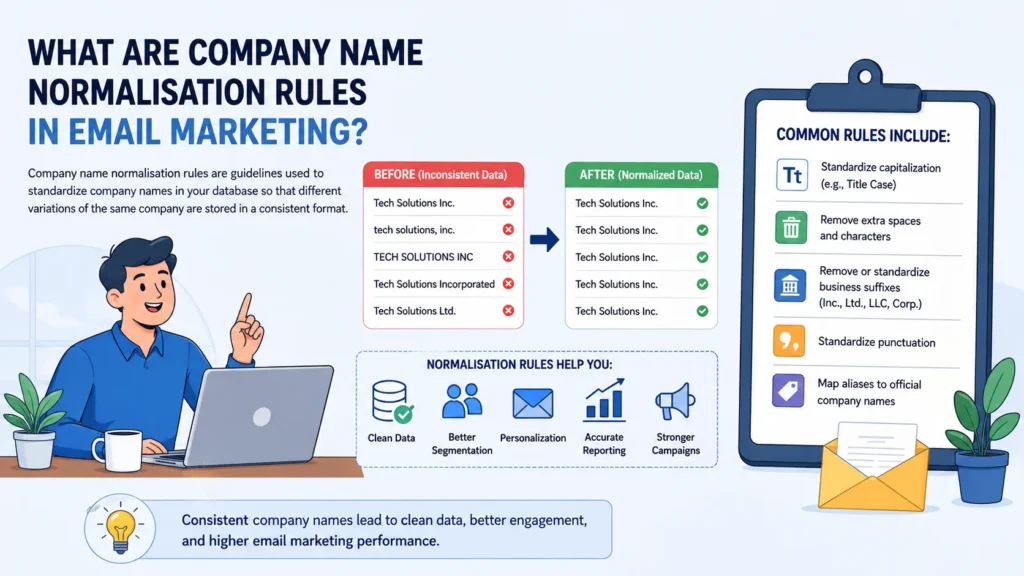
Table of Contents
What Are Company Name Normalisation Rules in Email Marketing?
Every email campaign relies on one thing more than marketers often realize: clean data. You can craft compelling subject lines, build sophisticated automations, and segment audiences with precision, but if your customer records are inconsistent, even the best strategy begins to unravel. One of the most common—and frequently overlooked—data quality issues is the way company names are stored across your database.
That’s where company name normalisation rules in email marketing come into play.
Company name normalisation is the process of applying a consistent set of formatting standards to company names so that every variation of the same business is recognised as a single entity. Rather than allowing dozens of different versions of a company name to exist in your CRM or email platform, normalization creates one standardized record that serves as the authoritative version.
Imagine your database contains the following entries:
- Microsoft
- Microsoft Corp.
- Microsoft Corporation
- MICROSOFT
- Microsoft Inc.
To a human, these clearly refer to the same company. A CRM or email marketing platform, however, may interpret each variation as a completely different organization. The result is fragmented customer data, duplicate records, inaccurate reporting, and email campaigns that don’t perform as expected.
Normalization solves this problem by establishing clear formatting rules that every company name must follow. Depending on your organization’s data standards, these rules may include:
- Converting company names into a consistent capitalization style, such as Title Case.
- Removing unnecessary punctuation and formatting inconsistencies.
- Standardizing—or removing—legal business suffixes like Inc., Ltd., LLC, Corp., and Corporation.
- Correcting common spelling mistakes and data-entry errors.
- Eliminating unnecessary spaces and unsupported special characters.
- Mapping abbreviations, aliases, and historical business names to a single official company record.
For example, a normalized database would transform multiple variations into one consistent value:
| Original Entry | Normalized Company Name |
|---|---|
| MICROSOFT CORP. | Microsoft |
| Microsoft Corporation | Microsoft |
| Microsoft Inc. | Microsoft |
| Microsoft Co. | Microsoft |
The benefits extend well beyond cleaner spreadsheets.
When every contact associated with a business shares the same standardized company name, marketers gain a far more reliable foundation for personalization, audience segmentation, reporting, and automation. Instead of splitting contacts across multiple company variations, email platforms can accurately recognize them as belonging to one organization, making every campaign smarter and every report more trustworthy.
Normalization also simplifies everyday database management. Duplicate company records become easier to identify, CRM integrations operate more smoothly, and automated workflows are far less likely to fail because of inconsistent field values.
As customer databases continue to expand through website forms, CRM integrations, third-party imports, and marketing automation tools, maintaining consistent company names becomes increasingly important. What may seem like a minor formatting issue today can quickly evolve into thousands of duplicate records tomorrow.
For that reason, company name normalization should be viewed as more than routine data cleaning. It’s a core component of effective data governance—one that supports accurate customer insights, improves campaign performance, and ensures your email marketing platform always works with reliable, standardized information.
Why Company Name Normalisation Matters for Email Marketing
The success of an email marketing campaign depends on more than persuasive copy and eye-catching designs. Behind every personalized message, automated workflow, and performance report lies a database that must be accurate, organized, and consistent. If your customer data is fragmented, your marketing efforts will be too.
This is exactly why company name normalisation rules in email marketing are so important.
At first glance, storing a company as “Apple Inc.” in one record and “APPLE” in another may not seem like a significant issue. After all, both names refer to the same business. Unfortunately, email marketing platforms and CRMs don’t always see it that way. Unless you’ve established normalization rules, those records may be treated as entirely separate organizations.
Consider a database containing these entries:
- Apple
- Apple Inc.
- APPLE
- Apple Incorporated
To your marketing team, they’re identical. To your software, they may represent four different companies.
That seemingly minor inconsistency can create a surprising number of problems. Contacts become scattered across multiple audience segments, duplicate company records accumulate, and reporting begins to tell an inaccurate story. Instead of seeing one complete customer profile, you’re left managing fragmented pieces of the same organization.
Cleaner Data Creates Better Personalization
Personalization works best when the underlying data is dependable.
Imagine sending a welcome email to several employees from the same company. Without standardized company names, your recipients might receive greetings like these:
- Welcome to our community, APPLE!
- Welcome, Apple Incorporated!
- Welcome, Apple Inc.!
Although technically correct, the inconsistency feels unprofessional. It subtly signals that your customer data isn’t well maintained.
When company names are normalized, every recipient receives a consistent, polished experience.
Welcome, Apple.
It’s a small difference, but details like these influence how customers perceive your brand. Clean data creates confidence, while inconsistent data quietly undermines credibility.
More Accurate Audience Segmentation
Segmentation is only as effective as the information used to build it.
Suppose you’re launching an account-based marketing campaign targeting existing customers at Apple. If your database stores the company under multiple names, some contacts may appear in one segment while others are excluded entirely. As a result, your campaign reaches only part of the intended audience.
Normalization eliminates this fragmentation by ensuring every contact linked to the same organization shares one standardized company name.
The outcome is straightforward:
- More accurate audience lists.
- Easier campaign management.
- Better targeting.
- Fewer missed opportunities.
Instead of juggling multiple versions of the same company, marketers can focus on delivering relevant content to a single, unified audience.
Reporting You Can Actually Trust
Marketing decisions depend on reliable data.
If company names aren’t standardized, campaign reports quickly become misleading. Engagement metrics become divided across duplicate company records, making it difficult to evaluate how a particular organization is interacting with your emails.
For example, one report may show activity for “Apple Inc.,” while another attributes similar engagement to “APPLE.” Although both datasets belong to the same customer, they’re measured separately.
Normalization removes this ambiguity.
With consistent company names, performance metrics—including open rates, click-through rates, conversions, and customer engagement—can be analyzed at the company level without duplicate records skewing the results. This produces clearer insights and gives marketing teams greater confidence when making strategic decisions.
Automation Depends on Consistency
Modern email marketing relies heavily on automation.
Lead nurturing campaigns, customer journeys, CRM synchronization, lead scoring, and lifecycle workflows all use customer data to determine what happens next. When company names are inconsistent, those automated processes become far less reliable.
A workflow designed to target employees from one organization may miss half of its intended audience simply because the company exists under several different names.
By implementing company name normalisation rules in email marketing, every workflow operates from a consistent set of data. Contacts move through automations correctly, duplicate triggers are reduced, and CRM integrations become significantly more reliable.
Better Data Leads to Better Marketing
Many marketers view company name normalization as a housekeeping task—a routine exercise in cleaning spreadsheets. In reality, it’s far more strategic than that.
Standardized company names improve virtually every aspect of email marketing. They strengthen personalization, simplify segmentation, increase reporting accuracy, support automation, and reduce the time spent fixing data issues manually.
As your customer database expands, maintaining clean company records becomes less of an optional best practice and more of a competitive advantage.
Ultimately, consistent company names don’t just create a tidier CRM—they provide the reliable foundation every successful email marketing strategy depends on.
Common Company Name Formatting Issues That Hurt Email Campaigns
Even the most sophisticated email marketing strategy can be undermined by something as simple as inconsistent company names.
Whether your contact data comes from website forms, CRM imports, sales teams, or third-party integrations, every source introduces the possibility of formatting inconsistencies. Over time, these seemingly harmless variations multiply, leaving you with duplicate company records, fragmented audience segments, and reports you can’t fully trust.
This is precisely why implementing company name normalisation rules in email marketing is essential. Before you can fix the problem, however, you need to recognize the issues that cause it.
Below are the most common formatting mistakes that quietly damage email marketing performance.
1. Inconsistent Capitalization
One of the easiest problems to overlook is inconsistent letter casing.
A single company might appear in your database as:
- AMAZON
- Amazon
- amazon
- AmaZon
Although every entry refers to the same business, many CRMs and email marketing platforms store them as separate values. That means contacts can become scattered across different records simply because someone used uppercase letters while another person used lowercase.
The solution is straightforward: choose one capitalization standard—Title Case is the most common—and apply it consistently across your entire database.
2. Multiple Versions of Business Suffixes
Legal business suffixes are another frequent source of inconsistency.
Consider these examples:
- IBM
- IBM Inc.
- IBM Corporation
- IBM Corp.
- IBM LLC
Depending on how your data is entered, every variation may be treated as a unique company.
Some organizations choose to remove legal suffixes altogether, while others standardize them into a single format. Either approach works, provided the rule is applied consistently throughout your CRM.
Without a clear standard, duplicate records become almost inevitable.
3. Hidden Spaces and Extra Whitespace
Whitespace errors are surprisingly common—and surprisingly disruptive.
For example:
- Google LLC
At first glance, the entries appear identical. Behind the scenes, however, leading spaces, trailing spaces, or multiple spaces between words can cause databases to recognize them as different values.
Because these invisible characters are difficult to spot during manual reviews, they often remain unnoticed for years.
Automatically trimming unnecessary whitespace during data imports is one of the simplest ways to improve database quality.
4. Inconsistent Punctuation
Punctuation introduces another layer of complexity.
The same company may be recorded in several different ways:
- AT&T
- AT & T
- A.T.&T.
- AT and T
Although each version clearly refers to the same organization, software doesn’t always interpret them equally.
Without normalization rules, searches become less reliable, duplicate detection becomes less effective, and customer records become increasingly fragmented.
Defining one accepted punctuation format eliminates much of this confusion.
5. Abbreviations and Company Aliases
Not every variation is a formatting mistake.
Many businesses are genuinely known by multiple names.
For example:
- International Business Machines
- IBM
- I.B.M.
Likewise:
- Meta Platforms
- Meta
All of these names may be perfectly valid depending on context.
Rather than treating them as separate organizations, an effective normalization strategy maps every variation to one standardized company name. This process—often called alias mapping—helps ensure every customer record points to the correct organization.
6. Misspellings and Typographical Errors
Human error is unavoidable.
Sales representatives type quickly. Customers complete web forms from mobile devices. Data is imported from countless external sources.
Eventually, mistakes happen.
Instead of “Microsoft,” your database may contain:
- Microsft
- Microsofft
- Microsfot
Or perhaps:
- Amazom
- Gogle
- Facebok
Each typo creates what appears to be a brand-new company.
Without spelling correction or validation rules, these errors continue to accumulate, making segmentation and reporting increasingly inaccurate over time.
7. Duplicate Company Records
Formatting issues rarely occur in isolation.
A single company record might combine inconsistent capitalization, unnecessary punctuation, spelling mistakes, extra spaces, and varying legal suffixes all at once.
For example, your CRM might contain:
- MICROSOFT CORP.
- Microsoft Corporation
- Microsoft Inc.
- microsoft
- Microsoft
To a person, these records are obviously connected.
To your software, they may represent five separate organizations.
Duplicate company records create a chain reaction of problems, including:
- Customers receiving duplicate emails.
- Fragmented audience segmentation.
- Inflated reporting metrics.
- Inefficient marketing automation.
- Inaccurate CRM synchronization.
The larger your customer database becomes, the more expensive these duplicates become to maintain.
Why Fixing These Issues Matters
Each formatting inconsistency may seem insignificant on its own. A missing period here, an extra space there, or a company entered in all capitals hardly feels like a critical problem.
Collectively, however, these small errors create a messy database that slows down marketing teams and reduces campaign effectiveness.
Implementing company name normalisation rules in email marketing ensures every company is represented by one clean, standardized record. The result is better personalization, more accurate audience segmentation, improved reporting, stronger automation, and a CRM that’s considerably easier to manage.
Ultimately, cleaner company data doesn’t just improve organization—it gives every email campaign a stronger foundation for success.
Essential Company Name Normalisation Rules Every Marketer Should Follow
Cleaning your customer database isn’t just about making it look tidy. It’s about creating a reliable source of truth that every marketing campaign, automation, and report can depend on.
Without clear standards, company names gradually become inconsistent as new contacts are added through forms, CRM imports, spreadsheets, sales teams, and third-party integrations. Before long, a single organization exists under several different names, making segmentation, personalization, and reporting unnecessarily complicated.
By implementing company name normalisation rules in email marketing, you can eliminate these inconsistencies before they become larger data management problems. The following rules form the foundation of an effective normalization strategy.
1. Adopt a Consistent Capitalization Style
The first rule is also one of the simplest: decide how company names should be capitalized and use that format everywhere.
For most organizations, Title Case is the preferred choice because it is easy to read and looks professional.
| Before | After |
|---|---|
| MICROSOFT | Microsoft |
| microsoft | Microsoft |
| MicroSoft | Microsoft |
Although capitalization may seem like a cosmetic issue, inconsistent letter casing often creates duplicate company records and makes filtering data far less reliable.
The key is consistency. Once you’ve chosen a standard, apply it to every existing and future record.
2. Standardize Business Suffixes
Legal suffixes can quickly clutter a database if they’re entered inconsistently.
For example, one customer might record a business as:
- Apple Inc.
- Apple Corporation
- Apple Corp.
- Apple LLC
- Apple
If your CRM treats each variation as unique, reporting and segmentation become fragmented.
Many organizations solve this by removing legal suffixes entirely, while others choose to keep a single standardized version. Neither approach is inherently better—the important thing is establishing one rule and applying it consistently.
| Before | After |
| Apple Inc. | Apple |
| Apple Corporation | Apple |
| Apple Corp. | Apple |
A consistent naming convention makes company records easier to search, compare, and maintain.
3. Remove Unnecessary Spaces
Extra spaces are among the most common—and least noticeable—data quality issues.
They often appear when information is copied from spreadsheets, submitted through online forms, or entered manually.
For example:
| Before | After |
| Google LLC | Google LLC |
To the human eye, these differences are almost invisible.
To a database, however, they can represent entirely different values.
Automatically trimming leading spaces, trailing spaces, and duplicate spaces between words is a simple improvement that prevents countless duplicate records over time.
4. Standardize Punctuation
Punctuation should never be left to individual preference.
Consider how many ways a company like AT&T can appear:
- AT&T
- AT & T
- A.T.&T.
- AT and T
Without normalization, each variation may be stored separately.
Choosing one approved punctuation format improves search accuracy, duplicate detection, CRM synchronization, and reporting consistency.
| Before | After |
| AT & T | AT&T |
| AT and T | AT&T |
Small formatting decisions like this have a surprisingly large impact on long-term data quality.
5. Correct Common Misspellings
No matter how carefully data is collected, spelling mistakes are inevitable.
Customers mistype company names. Sales representatives work quickly. Imported spreadsheets often contain errors that go unnoticed.
Some common examples include:
| Before | After |
| Microsft | Microsoft |
| Amazom | Amazon |
| Gogle |
Rather than correcting these mistakes manually every time they appear, create a list of known misspellings and automatically replace them during data imports or record updates.
Doing so prevents duplicate companies from accumulating over time.
6. Build Alias Mapping Rules
Not every variation is an error.
Many businesses operate under abbreviations, historical names, or widely recognized aliases.
For example:
| Before | Standard Company |
| IBM | IBM |
| International Business Machines | IBM |
| I.B.M. | IBM |
Another example would be:
- Meta Platforms
- Meta
Depending on your business requirements, all of these names may need to point to the same standardized company record.
Alias mapping ensures that every variation is recognized correctly, improving personalization, segmentation, and CRM accuracy.
It’s one of the most valuable company name normalisation rules in email marketing, particularly for organizations with large B2B databases.
7. Remove Unnecessary Special Characters
Company names sometimes contain symbols that provide little or no value within a CRM.
Examples include:
| Before | After |
| Acme™ | Acme |
| Company#1 | Company 1 |
| ABC® | ABC |
Removing unnecessary trademarks, registration symbols, and unsupported special characters creates cleaner records while improving compatibility across different marketing platforms and reporting tools.
Of course, this should always be done carefully. If a special character is genuinely part of a company’s official name, it should remain.
8. Review Your Rules Regularly
Normalization isn’t something you configure once and forget.
Businesses evolve.
Companies merge, rebrand, change legal structures, or introduce entirely new product brands. Your normalization rules should evolve alongside them.
Scheduling regular database audits—whether quarterly or twice a year—helps identify new inconsistencies before they spread throughout your CRM.
These reviews also provide an opportunity to:
- Add new company aliases.
- Update business suffix rules.
- Correct emerging spelling trends.
- Refine automation workflows.
- Remove outdated naming conventions.
Treat your normalization rules as a living framework rather than a static checklist.
Consistency Is the Real Goal
Each rule on its own delivers incremental improvements. Together, they create something much more valuable: a standardized database that supports every aspect of your email marketing strategy.
When company names follow a consistent structure, personalization becomes more accurate, audience segmentation becomes more precise, automation workflows run more reliably, and reporting reflects reality instead of fragmented data.
In the end, successful company name normalisation rules in email marketing aren’t about enforcing perfect formatting—they’re about creating dependable data that allows every campaign to perform at its full potential.
Examples of Company Name Normalisation Before and After
It’s one thing to understand the theory behind data normalization—it’s another to see it in action.
In most customer databases, inconsistent company names don’t appear because someone deliberately entered incorrect information. They accumulate naturally over time. Sales teams use one format, customers complete web forms differently, data is imported from multiple systems, and third-party applications often follow their own naming conventions.
The result is a database filled with multiple versions of the same company.
Applying company name normalisation rules in email marketing transforms those scattered records into a single, standardized format. The examples below illustrate how even small formatting changes can dramatically improve data quality.
Example 1: Standardizing Capitalization
Capitalization is one of the most common sources of inconsistency.
The same organization might appear several different ways depending on who entered the data.
| Before | After |
|---|---|
| MICROSOFT | Microsoft |
| microsoft | Microsoft |
| MicroSoft | Microsoft |
Using a consistent capitalization style—typically Title Case—makes company names easier to read while preventing duplicate records caused solely by differences in letter casing.
Although this seems like a minor adjustment, it creates a much cleaner and more reliable database.
Example 2: Removing or Standardizing Business Suffixes
Legal suffixes frequently vary between records, especially when data comes from multiple sources.
| Before | After |
| Apple Inc. | Apple |
| Apple Corporation | Apple |
| Apple Corp. | Apple |
Whether your organization decides to remove legal suffixes or standardize them into a single format, consistency is what matters.
When every record follows the same rule, customer data becomes far easier to search, segment, and analyze.
Example 3: Eliminating Extra Spaces
Whitespace errors are easy to miss because they are often invisible.
A company name with an extra space before or after it may look perfectly normal, yet databases frequently interpret it as a different value.
| Before | After |
| Google LLC | Google LLC |
Automatically trimming unnecessary spaces during data entry or import prevents these hidden inconsistencies from accumulating over time.
Example 4: Standardizing Punctuation
Different users often enter punctuation according to personal preference.
Without clear formatting rules, one company can appear in several different forms.
| Before | After |
| AT & T | AT&T |
| AT and T | AT&T |
| A.T.&T. | AT&T |
By choosing one approved punctuation format, businesses improve duplicate detection, search functionality, and CRM synchronization while making company names easier to maintain.
Example 5: Correcting Misspellings
Typos are unavoidable in any large customer database.
A single misplaced letter is enough to create what appears to be an entirely new company record.
| Before | After |
| Microsft | Microsoft |
| Amazom | Amazon |
| Gogle |
Creating automatic correction rules for commonly misspelled company names helps eliminate duplicate records before they affect segmentation or reporting.
The larger your database becomes, the more valuable these corrections become.
Example 6: Mapping Company Aliases
Not every variation is the result of poor formatting.
Many organizations are commonly known by abbreviations, historical names, or shortened versions of their official company name.
| Before | After |
| International Business Machines | IBM |
| I.B.M. | IBM |
| IBM | IBM |
Another example would be:
- Meta Platforms → Meta
- Facebook Inc. → Meta
- Meta → Meta
Alias mapping ensures that every legitimate variation points to the same standardized company record, creating a much more complete customer profile.
Example 7: Removing Unnecessary Special Characters
Special characters often appear when company names are copied from websites, legal documents, or branding materials.
While these symbols may have branding value, they rarely improve customer data inside a CRM.
| Before | After |
| Acme™ | Acme |
| Company#1 | Company 1 |
| ABC® | ABC |
Removing unnecessary symbols helps maintain compatibility across email marketing platforms, reporting tools, and CRM systems while producing cleaner, easier-to-read records.
Example 8: Combining Multiple Formatting Rules
In reality, company records rarely contain just one formatting issue.
More often, several inconsistencies appear together.
For example:
| Before | After |
| MICROSOFT CORPORATION | Microsoft |
| Microsoft Corp. | Microsoft |
| Microsoft Inc. | Microsoft |
| MICROSOFT | Microsoft |
| microsoft | Microsoft |
Here, multiple normalization rules work together simultaneously:
- Letter casing is standardized.
- Legal suffixes are removed.
- Duplicate variations are merged.
- Company names are unified under a single official record.
This is where company name normalisation rules in email marketing deliver their greatest value. Instead of treating each variation as a separate company, your CRM recognizes them all as one organization.
Small Changes, Significant Results
At first glance, these examples may appear to involve only cosmetic formatting changes. In practice, however, they solve some of the most common data quality problems facing marketing teams.
A cleaner company database means:
- More accurate audience segmentation.
- Better email personalization.
- Reliable campaign reporting.
- Stronger marketing automation.
- Easier CRM management.
- Fewer duplicate records.
Individually, each normalization rule offers a modest improvement. Together, they create a database that is easier to manage, easier to trust, and far more effective as the foundation for successful email marketing campaigns.
The cleaner your company data becomes, the more confidently you can personalize communications, automate workflows, and measure campaign performance—all without worrying that inconsistent company names are quietly undermining your results.
How to Create Effective Company Name Normalisation Rules
Creating effective company name normalisation rules in email marketing isn’t simply about removing punctuation or fixing spelling mistakes. It’s about establishing a repeatable process that keeps your customer data clean, accurate, and consistent—regardless of where it comes from.
Most businesses collect company information from a wide range of sources. Website contact forms, CRM systems, sales representatives, event registrations, third-party applications, and imported spreadsheets all contribute new records to the database. While this constant flow of data is valuable, it also introduces inconsistencies that accumulate over time.
Without a clear normalization strategy, even a well-maintained CRM can quickly become cluttered with duplicate company records and conflicting naming conventions.
The following steps will help you build a normalization process that scales as your database grows.
1. Audit Your Existing Company Data
Before creating normalization rules, you need to understand the current state of your data.
Start by reviewing your database for common issues such as:
- Duplicate company names
- Inconsistent capitalization
- Legal business suffix variations
- Misspellings and typing errors
- Extra spaces
- Punctuation differences
- Special characters
- Company aliases
One practical approach is to export a list of unique company names and sort them alphabetically. Patterns often become obvious once similar names appear together.
For example, you may discover entries such as:
- Microsoft
- Microsoft Corp.
- MICROSOFT
- Microsoft Inc.
- Microsoft Corporation
Although they all represent the same organization, your CRM may currently treat them as separate businesses.
Identifying these inconsistencies before making changes allows you to design normalization rules that address real problems rather than hypothetical ones.
2. Define a Standard Naming Convention
Once you’ve identified the inconsistencies, decide what every company name should look like going forward.
Your naming convention should answer questions such as:
- Will company names use Title Case?
- Should legal suffixes like Inc., LLC, Ltd., or Corp. be removed or retained?
- How should punctuation be handled?
- Should abbreviations be standardized?
- Which special characters should be removed?
Document these decisions clearly.
Without written standards, different departments will eventually return to entering company names according to their own preferences, recreating the same inconsistencies you’re trying to eliminate.
Consistency—not perfection—is the objective.
3. Build a Company Alias Dictionary
Many organizations operate under multiple names.
Some are known primarily by abbreviations, while others have changed their legal names through mergers or rebranding.
Creating an alias dictionary ensures that every variation points to one standardized company record.
For example:
| Company Variations | Standard Company Name |
|---|---|
| IBM, I.B.M., International Business Machines | IBM |
| Meta Platforms, Facebook Inc., Meta | Meta |
| Google Inc., Google LLC, Google |
As your business grows, this reference list will become one of your most valuable data management resources.
Rather than manually correcting the same variations repeatedly, your system can automatically recognize and normalize them.
4. Automate the Process Wherever Possible
Manual data cleaning may be manageable for a few hundred records.
It becomes unrealistic once your database reaches thousands—or hundreds of thousands—of contacts.
Automation allows company names to be standardized as data enters your CRM instead of requiring constant manual intervention afterward.
Depending on your platform, automated workflows can:
- Convert company names to Title Case.
- Remove unnecessary spaces.
- Standardize punctuation.
- Remove or normalize legal suffixes.
- Correct common spelling mistakes.
- Replace aliases with official company names.
- Detect likely duplicate records.
Automation not only saves time but also ensures that the same rules are applied consistently to every record.
5. Test Before Updating Your Entire Database
Applying new normalization rules directly to a live CRM without testing is risky.
A poorly designed rule could merge unrelated companies, overwrite valid information, or remove important parts of a company’s name.
Instead, begin with a small sample of records.
Review the results carefully and confirm that:
- Company variations merge correctly.
- No legitimate businesses are combined accidentally.
- Formatting changes match your documented standards.
- Important information isn’t lost.
Most importantly, create a complete backup of your database before making large-scale updates.
A few minutes spent testing can prevent hours—or even days—of recovery work later.
6. Document Every Rule
Normalization is rarely managed by one person forever.
Marketing teams change, sales teams expand, and new employees join the organization. Without documentation, everyone eventually develops their own way of entering company names.
A well-documented normalization policy should include:
- Capitalization standards
- Business suffix guidelines
- Punctuation rules
- Alias mappings
- Spelling correction rules
- Data validation procedures
- Examples of approved formatting
Think of this document as your company’s style guide for customer data.
The clearer your standards are, the easier they are to follow consistently.
7. Review and Refine Your Rules Regularly
Normalization isn’t a one-time project.
Businesses evolve continuously.
Companies merge, rebrand, change legal structures, launch new subsidiaries, or adopt different public-facing names. If your normalization rules never change, they eventually become outdated.
Schedule regular database reviews—quarterly or twice a year is sufficient for many organizations—to identify new inconsistencies and update your standards accordingly.
These reviews are also an excellent opportunity to:
- Add new aliases.
- Remove outdated company names.
- Improve automation workflows.
- Update spelling correction lists.
- Identify emerging formatting trends.
Ongoing maintenance is what keeps normalization effective over the long term.
Build a Process That Grows With Your Business
Successful company name normalisation rules in email marketing are built on repeatable processes rather than occasional cleanup efforts.
By auditing your existing data, defining clear naming standards, maintaining an alias dictionary, automating repetitive tasks, testing changes carefully, documenting every rule, and reviewing your standards regularly, you create a customer database that remains accurate as your business grows.
The payoff extends well beyond cleaner records.
Reliable company data improves personalization, strengthens audience segmentation, supports marketing automation, enhances CRM integrations, and produces reporting you can confidently use to guide future decisions.
In short, effective normalization isn’t just about organizing company names—it’s about creating a dependable data foundation that allows every email marketing campaign to perform at its best.
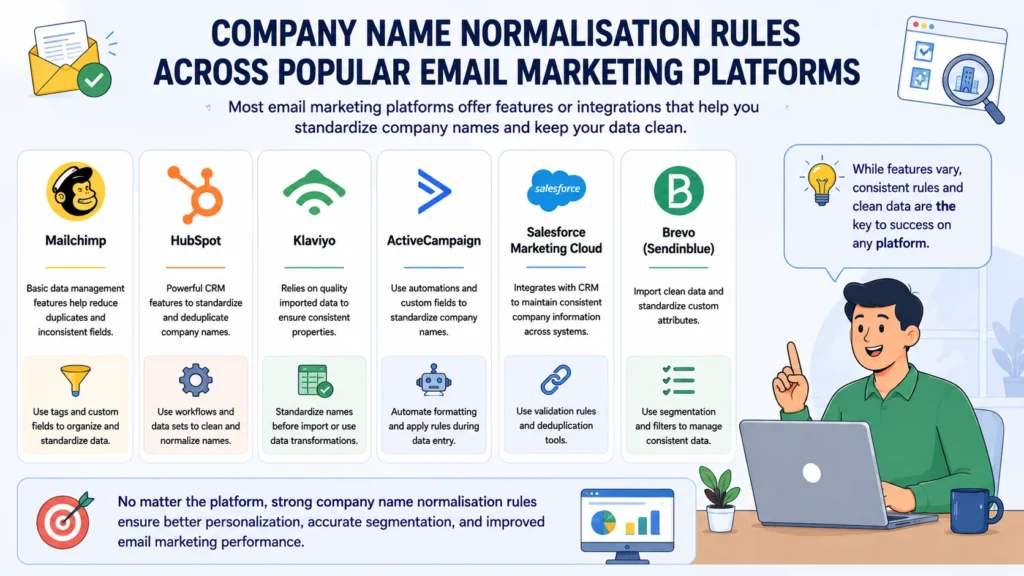
Company Name Normalisation Rules Across Popular Email Marketing Platforms
No two email marketing platforms handle customer data in exactly the same way. Some offer built-in data management tools, while others depend on integrations, workflows, or external applications to keep records organized.
What remains constant, however, is the importance of clean company data.
Regardless of the platform you use, inconsistent company names can lead to duplicate records, inaccurate audience segmentation, unreliable reporting, and automation workflows that don’t perform as expected. Implementing company name normalisation rules in email marketing ensures that every system is working with standardized information, making your campaigns more efficient and your customer data more reliable.
Let’s look at how some of the most widely used email marketing platforms approach company data and what you can do to maintain consistency.
Mailchimp
Mailchimp is known for its simplicity and ease of use, making it a popular choice for small and medium-sized businesses. It offers audience management through merge fields, tags, and segments, but it doesn’t automatically normalize company names when contacts are imported.
If one contact belongs to Microsoft and another is associated with Microsoft Corporation, Mailchimp treats those values exactly as they’re entered.
That means data quality depends almost entirely on what you import into the platform.
Best Practices for Mailchimp
- Normalize company names before importing contact lists.
- Use consistent merge field values across all audiences.
- Regularly review contacts for duplicate company records.
- Limit manual editing to reduce formatting inconsistencies.
A little preparation before importing data can prevent a significant amount of cleanup later.
HubSpot
HubSpot includes one of the strongest data management systems among modern CRM and marketing platforms.
Its workflows, duplicate management tools, custom properties, and automation features make it much easier to standardize company information across both marketing and sales operations.
Although HubSpot provides helpful data quality tools, it’s still important to define your own normalization rules. Automation performs best when it follows clear standards rather than trying to correct inconsistent data on its own.
Best Practices for HubSpot
- Use workflows to standardize company name formatting.
- Merge duplicate company records regularly.
- Apply validation rules to company properties.
- Review HubSpot’s duplicate suggestions on a routine basis.
- Keep marketing and sales teams aligned on naming conventions.
When used effectively, HubSpot can automate much of the normalization process while maintaining a high-quality CRM.
Klaviyo
Klaviyo focuses heavily on customer behavior, ecommerce data, and advanced segmentation. While it excels at personalized marketing, it assumes the customer data entering the platform is already clean.
Company names stored as profile properties remain exactly as they’re imported.
If multiple versions of the same company exist, they can easily affect segmentation and reporting.
Best Practices for Klaviyo
- Standardize company names before synchronizing customer profiles.
- Use consistent custom property values.
- Audit imported customer data regularly.
- Review company-related segments for duplicate values.
The cleaner your source data is, the more accurate Klaviyo’s powerful segmentation capabilities become.
ActiveCampaign
ActiveCampaign combines email marketing with CRM functionality and sophisticated automation tools.
Because so many workflows depend on contact properties, maintaining consistent company names is especially important.
Fortunately, the platform offers automations and custom fields that can help standardize records as new contacts enter the system.
Best Practices for ActiveCampaign
- Normalize company names during contact creation.
- Standardize custom fields before building automations.
- Review CRM records periodically for duplicate organizations.
- Include normalization as part of your lead management process.
Consistent data helps ensure automations trigger correctly and customer journeys remain accurate.
Salesforce Marketing Cloud
Organizations using Salesforce Marketing Cloud often manage customer data through Salesforce CRM before synchronizing it with their marketing environment.
This centralized approach makes normalization considerably easier because company names can be standardized before they’re shared across multiple systems.
Salesforce also provides duplicate management tools, automation capabilities, and customizable data models that support long-term data quality.
Best Practices for Salesforce Marketing Cloud
- Normalize company names within Salesforce CRM first.
- Synchronize only clean, validated data.
- Schedule regular duplicate detection reviews.
- Maintain consistent naming conventions across both sales and marketing teams.
Keeping CRM data clean before synchronization minimizes downstream issues throughout the marketing ecosystem.
Brevo (Formerly Sendinblue)
Brevo offers reliable contact management and email marketing features, but like many platforms, it relies on the quality of imported customer data.
If inconsistent company names enter the platform, they typically remain unchanged unless manually updated or corrected through external automation.
Best Practices for Brevo
- Clean customer data before importing contacts.
- Standardize custom attributes used for company information.
- Remove duplicate company records during regular database maintenance.
- Periodically audit imported contact lists for formatting inconsistencies.
A proactive approach to data quality helps Brevo deliver more accurate segmentation and reporting.
Platform Comparison
Although every platform approaches customer data differently, their underlying requirements are remarkably similar.
| Platform | Data Management | Automation Support | Manual Cleanup |
|---|---|---|---|
| Mailchimp | Basic | Moderate | High |
| HubSpot | Advanced | Excellent | Low |
| Klaviyo | Moderate | Excellent | Moderate |
| ActiveCampaign | Advanced | Excellent | Low |
| Salesforce Marketing Cloud | Advanced | Excellent | Low |
| Brevo | Basic | Moderate | Moderate |
Platforms with stronger CRM functionality generally provide better tools for maintaining standardized company data. However, even the most advanced software cannot fully compensate for inconsistent information entering the system.
Technology Helps—But Data Standards Matter More
It’s tempting to assume that modern marketing platforms will automatically fix inconsistent customer data.
In reality, software is only as effective as the information it receives.
Even advanced CRMs struggle when company names are entered differently across forms, spreadsheets, sales systems, and third-party integrations. Without clear normalization standards, duplicate records and fragmented customer profiles inevitably return.
That’s why company name normalisation rules in email marketing remain essential regardless of the platform you choose.
Whether you’re using Mailchimp to send newsletters, HubSpot to manage inbound marketing, Klaviyo for ecommerce automation, or Salesforce Marketing Cloud for enterprise campaigns, success depends on maintaining one consistent version of every company name.
Establishing clear naming conventions, automating repetitive formatting tasks where possible, and auditing your database regularly will produce cleaner customer records, more accurate segmentation, stronger automation, and reporting you can trust.
Ultimately, technology can support good data management—but it cannot replace it.
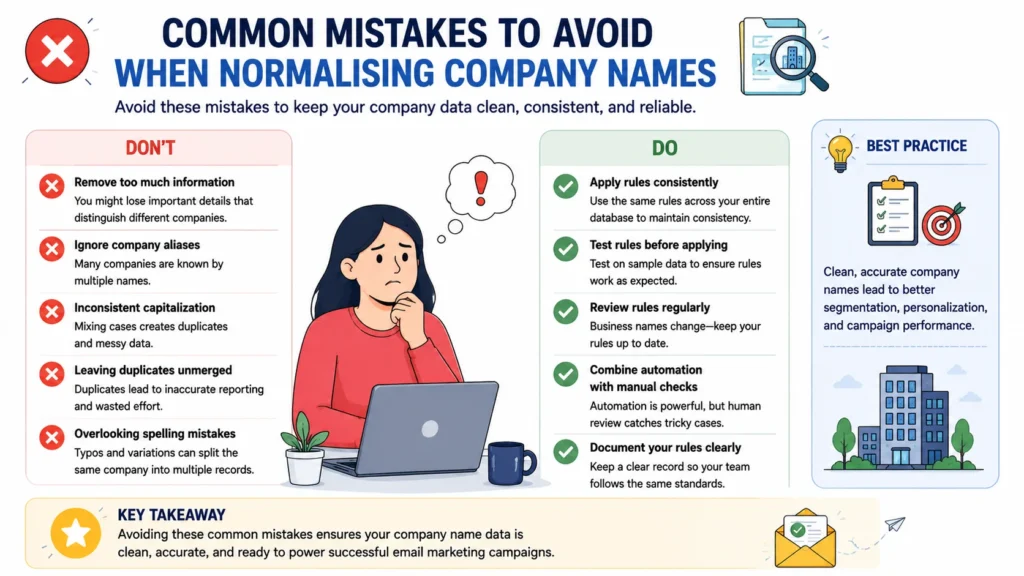
Common Mistakes to Avoid When Normalising Company Names
Implementing company name normalisation rules in email marketing can dramatically improve the quality of your customer data—but only if those rules are applied thoughtfully. A poorly planned normalization strategy can introduce just as many problems as it solves, leading to inaccurate records, broken automations, and misleading reports.
The objective isn’t simply to make company names look uniform. It’s to preserve meaningful information while creating a database that is consistent, searchable, and easy to maintain.
Below are some of the most common mistakes marketers make when normalizing company names—and how to avoid them.
1. Removing Important Information
Simplifying company names is useful, but oversimplifying them can create confusion.
For example, many businesses remove legal suffixes such as Inc., Ltd., or LLC without considering whether other words are equally important to the company’s identity.
Consider these examples:
| Incorrect Normalization | Better Approach |
|---|---|
| ABC Holdings Ltd. → ABC | Keep Holdings if it distinguishes the business. |
| XYZ Group PLC → XYZ | Retain Group when it’s part of the official company name. |
Words like Group, Holdings, International, or Technologies often differentiate one organization from another. Removing them indiscriminately increases the risk of merging unrelated companies.
Before deleting any part of a company name, ask whether it contributes to the company’s identity.
2. Ignoring Company Aliases
Many organizations operate under multiple names.
Some are known primarily by abbreviations, while others have rebranded or use different names in different markets.
For example:
- International Business Machines
- IBM
- I.B.M.
Or:
- Meta Platforms
- Meta
Without alias mapping, these variations are often stored as separate companies, resulting in fragmented customer records and inaccurate reporting.
Maintaining an up-to-date alias dictionary ensures that every recognized variation points to a single standardized company record.
3. Applying Inconsistent Capitalization
Capitalization might seem like a cosmetic issue, but inconsistent letter casing can create duplicate values in many CRM systems.
For example:
- AMAZON
- Amazon
- amazon
Although they represent the same organization, databases frequently interpret them as unique entries.
Choosing one capitalization standard—typically Title Case—and applying it consistently eliminates this unnecessary duplication while improving readability.
4. Forgetting to Merge Duplicate Records
Standardizing company names is only half the job.
If duplicate records remain after normalization, your database continues to suffer from fragmented customer information.
Duplicate companies can lead to:
- Contacts receiving the same email more than once.
- Inaccurate audience segmentation.
- Inflated reporting metrics.
- Conflicting CRM records.
- Inefficient automation workflows.
After applying normalization rules, perform a duplicate review to consolidate records wherever appropriate.
A clean naming convention is most effective when it’s paired with an equally clean database.
5. Overlooking Spelling Mistakes
Typing errors are one of the most common sources of inconsistent company data.
A single missing or misplaced letter can create what appears to be an entirely new organization.
Examples include:
| Before | After |
| Microsft | Microsoft |
| Amazom | Amazon |
| Gogle |
These errors may seem insignificant individually, but they accumulate surprisingly quickly in large databases.
Adding common misspellings to your normalization rules—or using automated validation tools—helps prevent these mistakes from affecting segmentation and reporting.
6. Failing to Apply Rules Consistently
Normalization isn’t effective if different teams follow different standards.
Marketing may remove legal suffixes while Sales keeps them. Customer Support might enter company names in uppercase, while Operations uses Title Case.
Before long, inconsistencies begin creeping back into the database.
To prevent this, establish a documented naming policy that everyone follows.
Consistency across departments is just as important as consistency within your CRM.
7. Skipping the Testing Phase
Applying new normalization rules directly to a live database without testing is a mistake that can be difficult—and sometimes impossible—to reverse.
An overly aggressive rule may:
- Merge unrelated companies.
- Remove meaningful information.
- Overwrite valid records.
- Trigger unexpected automation errors.
Before making large-scale changes:
- Test your rules on a sample dataset.
- Verify the results manually.
- Confirm that only appropriate records are merged.
- Back up your database before deployment.
A small amount of preparation can prevent significant data recovery work later.
8. Treating Normalization as a One-Time Task
Customer data isn’t static.
Businesses rebrand, merge, launch new subsidiaries, or change their legal names. New customers introduce previously unseen abbreviations, aliases, and formatting variations every week.
If your normalization rules never evolve, your database gradually becomes inconsistent again.
Schedule regular reviews to:
- Update alias mappings.
- Add newly discovered spelling corrections.
- Remove outdated company names.
- Refine formatting rules.
- Audit duplicate records.
Normalization should be viewed as an ongoing maintenance process rather than a one-off cleanup project.
9. Relying Entirely on Manual Data Cleaning
Manually reviewing company names might be practical when you have a few hundred contacts.
It becomes unrealistic once your database grows into the thousands.
Manual processes are slower, less consistent, and far more susceptible to human error.
Where possible, automate repetitive tasks such as:
- Standardizing capitalization.
- Removing unnecessary spaces.
- Correcting common spelling mistakes.
- Applying alias mappings.
- Detecting duplicate records.
Automation doesn’t eliminate the need for oversight, but it significantly reduces the time and effort required to maintain a clean database.
Build Accuracy Into Your Process
Avoiding these common mistakes is just as important as creating normalization rules in the first place.
A successful normalization strategy balances consistency with accuracy, ensuring that valuable information isn’t lost while duplicate records and formatting inconsistencies are eliminated.
When implemented carefully, company name normalisation rules in email marketing create a stronger foundation for personalization, audience segmentation, CRM integration, reporting, and marketing automation.
The result isn’t simply a cleaner database—it’s a more reliable marketing system that allows every campaign to reach the right audience with greater precision and confidence.
How Automation Simplifies Company Name Normalisation
As your customer database grows, manually maintaining company names becomes increasingly difficult. What starts as a few inconsistent entries can quickly snowball into hundreds—or even thousands—of duplicate records spread across your CRM and email marketing platform.
That’s where automation becomes invaluable.
Rather than relying on employees to correct formatting issues one record at a time, automated workflows apply company name normalisation rules in email marketing consistently whenever new data enters your system. The result is cleaner customer records, fewer manual corrections, and a database that stays organized without constant maintenance.
Automation doesn’t replace good data management practices—it reinforces them by ensuring every record follows the same standards from the moment it’s created.
Automatically Standardize Company Names
One of automation’s biggest advantages is consistency.
Every new contact imported into your CRM can be processed using the same predefined rules, eliminating the variation that naturally occurs with manual data entry.
For example, automation can instantly:
- Convert company names to Title Case.
- Remove leading and trailing spaces.
- Standardize punctuation.
- Remove or normalize legal suffixes such as Inc., LLC, Ltd., and Corp.
- Replace known aliases with an official company name.
- Correct common spelling mistakes.
Instead of cleaning your database after problems appear, automation prevents many of those problems from occurring in the first place.
Detect and Merge Duplicate Records
Duplicate company records are rarely obvious.
One customer might enter Microsoft, while another uses Microsoft Corporation, and a sales representative records MICROSOFT CORP. Although they refer to the same organization, your CRM may store them separately.
Automation can compare records using predefined matching rules and identify likely duplicates before they create reporting or segmentation issues.
For example:
| Duplicate Entries | Standardized Result |
|---|---|
| Microsoft Corp. | Microsoft |
| Microsoft Corporation | Microsoft |
| MICROSOFT | Microsoft |
Automatically consolidating duplicate company records creates a more accurate customer profile while reducing unnecessary clutter throughout your CRM.
Clean Data During Imports
Data imports are one of the most common sources of inconsistent company names.
Whether you’re importing contacts from spreadsheets, migrating between CRM systems, or syncing information from third-party applications, formatting inconsistencies often arrive alongside the data.
Automation helps clean records before they become permanent.
Typical import workflows can:
- Remove extra spaces.
- Correct capitalization.
- Standardize punctuation.
- Replace aliases.
- Remove unnecessary symbols.
- Match imported companies against existing records.
By validating data during the import process, you reduce the amount of cleanup required later.
Improve Email Personalization
Personalized emails rely entirely on accurate customer data.
If the same company exists under several different names, recipients may receive inconsistent or awkward-looking personalization.
For example:
- Welcome, MICROSOFT!
- Welcome, Microsoft Corporation!
- Welcome, Microsoft Inc.!
Although technically correct, the inconsistency feels unpolished.
After normalization, every recipient sees the same professional greeting:
Welcome, Microsoft!
It may seem like a small improvement, but consistent personalization reinforces your brand’s professionalism and creates a better customer experience.
Strengthen Marketing Automation Workflows
Modern email marketing platforms depend heavily on automation.
Lead nurturing campaigns, lifecycle journeys, customer segmentation, lead scoring, and CRM synchronization all rely on company data to determine what happens next.
When company names are inconsistent, automation rules may:
- Miss eligible contacts.
- Trigger duplicate workflows.
- Assign incorrect lead scores.
- Place customers into the wrong audience segment.
Applying company name normalisation rules in email marketing automatically ensures these workflows operate using reliable, standardized information.
The result is fewer errors and significantly more dependable automation.
Reduce Manual Work for Your Team
Perhaps the greatest benefit of automation is the time it saves.
Instead of repeatedly correcting capitalization, removing spaces, merging duplicate records, or fixing spelling mistakes, marketing teams can focus on higher-value activities such as:
- Building campaigns.
- Creating personalized content.
- Analyzing performance.
- Optimizing customer journeys.
- Developing new marketing strategies.
Automation handles repetitive formatting tasks consistently and efficiently, reducing both workload and the likelihood of human error.
Keep CRM and Marketing Platforms in Sync
Most organizations don’t rely on a single application.
Customer data often moves between website forms, CRM systems, email marketing platforms, sales software, customer support tools, and analytics platforms.
Without standardized company names, inconsistencies spread quickly from one system to another.
Automation helps maintain a single, consistent company name across your entire technology stack by applying the same normalization rules wherever customer data is created or updated.
This improves synchronization, minimizes data conflicts, and ensures every department is working with the same information.
Automation Supports Better Data—It Doesn’t Replace Good Standards
Automation is a powerful tool, but it’s only as effective as the rules behind it.
If your normalization standards are poorly defined, automation will simply apply those inconsistencies more efficiently.
That’s why the first step is always establishing clear naming conventions. Once those standards are in place, automation ensures they’re applied consistently across every record, every import, and every integration.
Ultimately, automating company name normalisation rules in email marketing allows businesses to maintain cleaner customer databases with far less effort. It improves personalization, strengthens audience segmentation, reduces duplicate records, enhances reporting accuracy, and keeps marketing automation running smoothly as your database continues to grow.
For organizations managing thousands of contacts—or millions—automation isn’t just a convenience. It’s an essential part of maintaining long-term data quality and scalable email marketing operations.
Benefits of Company Name Normalisation for Email Marketing Performance
Clean customer data is one of the most valuable assets a marketing team can have. Every campaign, automated workflow, customer journey, and performance report depends on the accuracy of the information stored in your database.
When company names are inconsistent, those processes become less reliable. Duplicate records appear, audience segments become fragmented, and reporting no longer reflects the complete picture.
By implementing company name normalisation rules in email marketing, businesses create a standardized database that supports better decision-making, more effective campaigns, and a smoother customer experience.
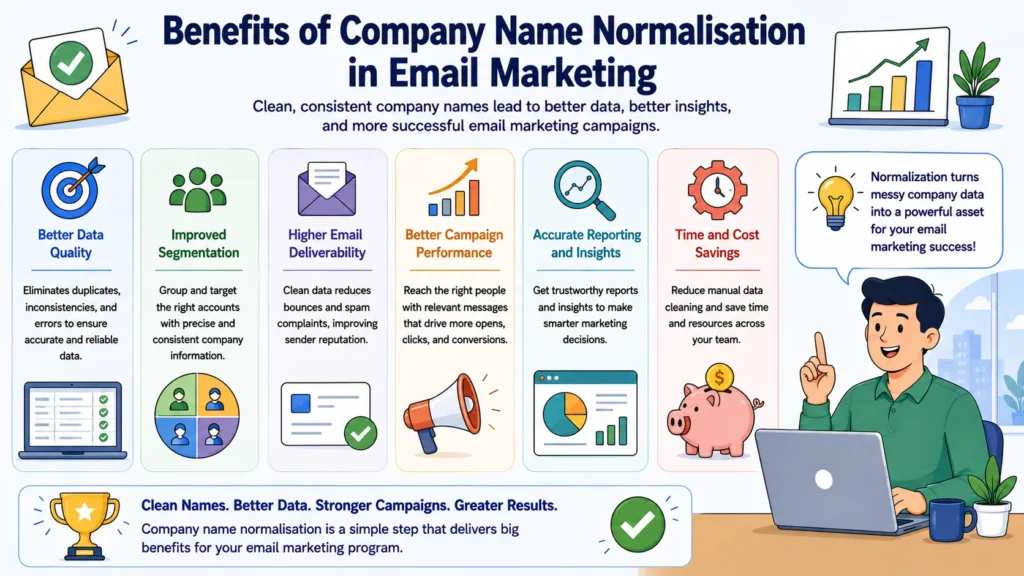
Here are the biggest benefits of maintaining consistent company names.
1. Improved Data Accuracy
Every successful email campaign starts with trustworthy data.
If a single company exists under multiple names, your CRM can no longer provide an accurate view of that customer relationship. Contacts become scattered across duplicate records, making it difficult to understand who your customers are and how they’re interacting with your business.
Normalization solves this by ensuring every organization is represented by one consistent company name.
The result is a cleaner database that’s easier to search, manage, and trust.
Accurate data also reduces the amount of time marketing teams spend correcting errors, allowing them to focus on strategy instead of administrative tasks.
2. Better Email Personalization
Personalization has become an expectation rather than a luxury.
Customers notice when emails reference their company correctly, just as they notice when they don’t.
Without normalization, recipients from the same organization might receive greetings like:
- Welcome, MICROSOFT!
- Welcome, Microsoft Corporation!
- Welcome, Microsoft Inc.!
While technically correct, the inconsistency looks unprofessional and can diminish confidence in your brand.
After normalization, every recipient sees the same polished message:
Welcome, Microsoft!
It’s a subtle improvement, but one that contributes to a more consistent and professional customer experience.
3. More Accurate Audience Segmentation
Segmentation works only when the underlying data is consistent.
Imagine creating a campaign specifically for customers at Google. If your database contains:
- Google LLC
- Google Inc.
your contacts may be split across multiple audience segments instead of grouped together.
This fragmentation makes campaigns less effective and increases the risk of excluding valuable customers.
By applying company name normalisation rules in email marketing, every contact associated with the same organization belongs to one standardized company profile, making segmentation far more accurate and considerably easier to manage.
4. Reliable Reporting and Analytics
Marketing decisions are only as good as the data behind them.
Duplicate company names often distort performance metrics by spreading customer activity across multiple records.
Instead of viewing engagement from one organization, you may unknowingly analyze several incomplete reports.
Normalization consolidates these records into a single company profile, producing more reliable insights for metrics such as:
- Open rates
- Click-through rates
- Conversion rates
- Customer engagement
- Campaign performance by company
With cleaner data, reports become a dependable foundation for future marketing decisions rather than something that constantly requires manual interpretation.
5. Stronger Marketing Automation
Automation depends on consistency.
Whether you’re nurturing leads, assigning lifecycle stages, triggering follow-up emails, or synchronizing CRM data, automated workflows rely on company information to make decisions.
When company names vary from one record to another, automation rules may fail to recognize related contacts or trigger duplicate actions.
Normalization removes this uncertainty by ensuring every workflow references the same standardized company name.
The result is smoother automation, fewer errors, and campaigns that perform exactly as intended.
6. Fewer Duplicate Records
Duplicate records create problems throughout the entire customer lifecycle.
They can lead to:
- Multiple emails being sent to the same organization.
- Inflated reporting metrics.
- Fragmented customer histories.
- Confusing CRM records.
- Inefficient sales and marketing collaboration.
Normalization helps identify duplicate companies early and consolidates them into a single, complete customer profile.
Over time, this significantly improves the overall health of your database.
7. Better CRM Integration
Modern businesses rarely rely on one platform.
Customer information typically flows between CRM systems, email marketing software, sales applications, customer support platforms, website forms, and analytics tools.
If company names are inconsistent in one system, those inconsistencies often spread throughout the rest of your technology stack.
Standardized company names improve synchronization between platforms, reducing data conflicts and ensuring every department works with the same information.
A unified customer record benefits not only marketing but also sales, customer success, and operations.
8. Increased Team Productivity
Marketing teams shouldn’t spend their time fixing formatting issues.
Unfortunately, inconsistent customer data often forces employees to manually correct company names before launching campaigns, building reports, or creating audience segments.
Normalization removes much of this repetitive work.
Instead of cleaning data, your team can focus on activities that create real business value, such as:
- Developing campaigns.
- Optimizing customer journeys.
- Improving personalization.
- Analyzing performance.
- Creating better customer experiences.
Cleaner data leads to faster workflows and more productive teams.
9. A Better Customer Experience
Every interaction contributes to how customers perceive your brand.
When emails contain inconsistent company names, duplicate communications, or inaccurate personalization, they create unnecessary friction.
While recipients may overlook an occasional formatting issue, repeated inconsistencies can make your organization appear disorganized.
Standardized company names help deliver a more polished experience across every touchpoint, reinforcing professionalism and strengthening customer trust.
Sometimes, it’s the smallest details that leave the strongest impression.
10. Long-Term Data Quality
Perhaps the greatest advantage of normalization is its lasting impact.
As your customer database grows, maintaining consistent company names becomes increasingly important. Every new contact, CRM integration, spreadsheet import, and automation workflow adds more data to manage.
Without clear standards, inconsistencies multiply quickly.
By establishing company name normalisation rules in email marketing, you create a scalable framework that keeps your database organized regardless of how large it becomes.
Instead of repeatedly correcting the same problems, you prevent them from occurring in the first place.
Clean Data Creates Better Marketing
Company name normalization isn’t simply an administrative task hidden behind the scenes. It’s a strategic investment that improves nearly every aspect of email marketing.
From personalization and audience segmentation to reporting, automation, CRM integration, and customer experience, standardized company names provide the consistency needed for reliable marketing operations.
The cleaner your data becomes, the more confidently you can build campaigns, analyze results, and automate customer interactions.
Ultimately, company name normalisation rules in email marketing help transform a cluttered customer database into a dependable business asset—one that supports smarter decisions, stronger customer relationships, and better marketing performance for years to come.
Frequently Asked Questions About Company Name Normalisation Rules in Email Marketing
Even after understanding the basics of company name normalization, marketers often have practical questions about implementation, maintenance, and long-term management. Below are answers to some of the most common questions about company name normalisation rules in email marketing.
What are company name normalisation rules in email marketing?
Company name normalisation rules are a set of standards used to ensure that every variation of a company’s name is stored in a consistent format across your customer database.
For example, entries such as Microsoft, Microsoft Corp., Microsoft Corporation, and MICROSOFT can all be standardized into a single company name. Doing so improves data accuracy and allows your CRM and email marketing platform to recognize them as the same organization.
Why is company name normalization important?
Consistent company names make your customer data significantly more reliable.
When duplicate or inconsistent records exist, audience segmentation becomes less accurate, personalization can appear unprofessional, and campaign reports may produce misleading results.
Normalization helps create a cleaner database, making it easier to automate campaigns, analyze customer engagement, and deliver more relevant email experiences.
What causes inconsistent company names?
In most cases, inconsistencies develop naturally as data is collected from multiple sources.
Common causes include:
- Manual data entry
- CRM imports
- Website contact forms
- Spreadsheet uploads
- Third-party integrations
- Sales and customer support teams using different naming conventions
Without clear standards, even a well-managed database will gradually accumulate formatting inconsistencies.
Should legal suffixes like Inc., LLC, or Ltd. be removed?
There isn’t a universal answer.
Many organizations remove legal suffixes to simplify company names, while others retain them because they’re important for distinguishing similar businesses.
The key is consistency. Whichever approach you choose, apply the same rule across your entire customer database to avoid duplicate records.
How often should normalization rules be reviewed?
Company data isn’t static.
Businesses rebrand, merge, acquire other companies, and occasionally change their legal names. New abbreviations and aliases also emerge over time.
For most organizations, reviewing normalization rules every three to six months is sufficient. However, businesses that import customer data frequently may benefit from more regular audits.
Routine reviews help keep your database accurate as it grows.
Can company name normalization be automated?
Absolutely.
Most modern CRM systems and email marketing platforms support automation through workflows, integrations, or third-party data management tools.
Automation can:
- Standardize capitalization.
- Remove extra spaces.
- Normalize punctuation.
- Correct common spelling mistakes.
- Apply alias mappings.
- Detect duplicate company records.
Automating these repetitive tasks saves time while ensuring every new record follows the same formatting standards.
Which email marketing platforms support company name normalization?
Most platforms can support company name normalization in one way or another, although the available tools vary.
Popular platforms include:
- Mailchimp
- HubSpot
- Klaviyo
- ActiveCampaign
- Salesforce Marketing Cloud
- Brevo
Some platforms provide advanced automation and duplicate management features, while others rely more heavily on clean data being imported into the system.
Regardless of the software you use, maintaining standardized company names remains a best practice.
Does normalization improve email personalization?
Yes.
Personalization is only effective when the underlying customer data is accurate.
If company names are inconsistent, recipients from the same organization may receive emails displaying different versions of their company name. While this may seem like a minor detail, it can make your communications feel less polished.
Normalization ensures every customer receives consistent, professional-looking emails that reinforce your brand’s credibility.
How does normalization improve audience segmentation?
Audience segmentation depends on grouping similar contacts together.
If one company exists under several different names, employees from that organization may be divided across multiple audience segments.
Standardizing company names ensures every contact associated with the same business belongs to a single company profile, making segmentation more accurate and campaigns easier to manage.
Will normalization improve reporting accuracy?
In most cases, yes.
Duplicate company records often split engagement data across multiple entries, making campaign performance more difficult to evaluate.
Normalization consolidates those records, providing clearer reporting for metrics such as:
- Open rates
- Click-through rates
- Conversion rates
- Customer engagement
- Company-level campaign performance
Cleaner data leads to reports that better reflect reality, giving marketing teams greater confidence in their decisions.
What’s the best way to start implementing company name normalisation rules?
Begin with a thorough review of your existing customer database.
Identify duplicate company records, inconsistent formatting, spelling mistakes, unnecessary punctuation, extra spaces, and common aliases. Once you’ve identified the most frequent issues, establish a standard naming convention and document it clearly.
From there, you can automate repetitive formatting tasks, merge duplicate records, and schedule regular data quality reviews to keep your database consistent over time.
Starting with a clear strategy makes ongoing maintenance far easier.
Final Thoughts
Company names may seem like a small detail within a customer database, but their impact extends far beyond simple formatting. Consistent company records improve personalization, strengthen audience segmentation, enhance reporting accuracy, support reliable automation, and simplify CRM management.
Implementing company name normalisation rules in email marketing isn’t just about cleaning existing data—it’s about creating a long-term framework that keeps your customer information accurate as your business grows.
Whether you’re managing a few thousand contacts or millions of customer records, standardized company names provide the foundation for better email marketing, more dependable analytics, and a smoother customer experience.
In the end, successful campaigns don’t rely solely on compelling content or sophisticated automation. They rely on trustworthy data. And that trust begins with something as fundamental as keeping every company name consistent.
Looking for the right marketing tools? Explore expert reviews, comparisons, and guides at AmiinMarketer.com.